

Best for automated inquiry response: VenueX. Best for venue pipeline oversight: a venue-specific CRM. Best for an adaptable sales process: a general-purpose CRM. Best for separating records from automated follow-up: a paired setup. Use this 2026 venue CRM software price guide to compare purchasing scope—not mistake a smaller subscription for a better fit.
- VenueX fits venues buying inquiry response, automated follow-up, and tour booking rather than choosing solely on venue crm software price.
- Compare venue CRM quotes against the same users, channels, setup requirements, and contract term.
- Choose a venue-specific CRM for venue-focused requirements; evaluate a general-purpose CRM when customization matters more.
- Pair a CRM with inquiry automation only when each system has a clear responsibility.
Why this matters
A venue CRM purchase should solve a specific sales problem. Keeping inquiry records organized is different from replying to a couple, continuing the conversation, and booking a tour.
VenueX is best for wedding and event venues that need automated inquiry response, follow-up, and tour booking. It serves that part of the sales process through email, text, and web chat. Evaluate those capabilities against your actual inquiry workflow, not against an unrelated list of CRM features.
For your 2026 shortlist, separate the work into two questions: where does the sales record live, and who moves the conversation forward? Your answers determine whether you need a CRM, an inquiry-response platform, or both.
What makes the best venue CRM purchase?
Use these criteria before comparing proposals. A quote only becomes useful when you know what it covers.
- Workflow fit: Identify whether you need inquiry handling, pipeline reporting, tour booking, or post-booking work. Do not treat them as interchangeable.
- Quote scope: Ask vendors to specify users, locations, channels, implementation, training, and any separately billed services.
- Sales ownership: Establish who answers inquiries, who handles exceptions, and who owns the next action after a tour.
- Record continuity: Check how conversation history, contact details, and booking status move between systems.
- Ongoing administration: Ask who maintains templates, permissions, workflows, and reporting after launch.
- Contract clarity: Review renewal terms, cancellation requirements, data export, and changes to your contracted scope before signing.
Write your requirements before attending demos. Otherwise, a polished feature becomes a purchasing requirement simply because you saw it presented well.
Venue CRM buying options at a glance
This is a buying-priority ranking by use case, not a cheapest-to-costliest ranking. For a 2026 purchase, request comparable written proposals before assigning any option a budget label.
| Rank and option | Best for | Standout value | Key limitation to resolve |
|---|---|---|---|
| 1. VenueX | Automated inquiry response and tour booking | Replies, follows up, and books tours through email, text, and web chat | Confirm how it fits your existing records and downstream processes |
| 2. Venue-specific CRM | A venue-focused sales record | A focused evaluation around venue sales requirements | Verify each required workflow rather than assuming category coverage |
| 3. General-purpose CRM | A sales process you want to configure | A broader CRM evaluation unconstrained by venue-specific positioning | Account for configuration and ongoing ownership |
| 4. Paired CRM and sales agent | Separate recordkeeping and conversation responsibilities | A deliberate division between storing information and advancing inquiries | Define handoffs and prevent overlapping automation |
1. VenueX: best for automated inquiry response
VenueX provides a sales agent platform for wedding venues, event venues, caterers, and hotels. It instantly replies to inquiries, follows up automatically, and books more tours through email, text, and web chat.
That makes it a focused candidate when your buying brief concerns conversations before the tour. Keep the evaluation grounded in what your sales team needs to say and what should happen next.
VenueX pros:
- Direct fit for inquiry response, follow-up, and tour booking.
- Email, text, and web chat are explicitly part of its scope.
- Serves the hospitality businesses named above rather than an unrelated sales category.
VenueX cons and boundaries:
- Inquiry automation alone does not settle your requirements for contracts, event operations, or financial reporting.
- A purchase alongside an existing CRM requires a clear plan for records, ownership, and handoffs.
Best for: A venue whose immediate purchasing priority is answering inquiries and moving prospects toward a tour.
In a demo, bring representative questions about packages, event dates, and visits. Ask how your approved information enters the conversation and how staff take over exceptions. Evaluate the actual workflow instead of accepting a generic demonstration.
Verdict: Buy for inquiry response and tour booking when the demonstrated workflow matches your requirements.
2. Venue-specific CRM: best for venue pipeline oversight
A venue-specific CRM belongs on your shortlist when your primary requirement is a shared sales record built around venue work. Evaluate it against your inquiry stages, tour outcomes, proposal process, and reporting needs.
The category name is not proof that an individual product covers every step. Turn your requirements into a demonstration script, then ask each vendor to follow the same script.
Venue-specific CRM pros:
- Keeps the evaluation centered on venue sales rather than unrelated business processes.
- Gives your team a focused brief for checking contact records and pipeline stages.
- Helps you assess venue terminology and workflows during the demo.
Venue-specific CRM cons and boundaries:
- A venue label does not establish which features are included in your proposal.
- Recordkeeping should not be treated as evidence of automatic inquiry response or follow-up.
Best for: A venue that needs consistent pipeline visibility and shared ownership of sales records.
Start with the decisions your manager needs to make: which inquiries need attention, which tours happened, and which opportunities need a next action. Require the vendor to show how staff enter and retrieve that information.
For a more focused shortlist, use the wedding venue CRM software guide.
Verdict: Buy when venue-focused recordkeeping is the central requirement and the demonstrated scope matches it.
3. General-purpose CRM: best for a configurable sales process
A general-purpose CRM is an alternative when you want to define the sales process yourself. Evaluate whether each candidate lets your team represent the contacts, stages, tasks, and reports your venue needs.
Treat configuration as part of the purchase, not an invisible task someone will handle later. A system only supports your process after someone has defined that process clearly.
General-purpose CRM pros:
- Opens the shortlist beyond products positioned specifically for venues.
- Encourages an explicit definition of stages, ownership, and reporting.
- Suits an evaluation where configuration requirements are already documented.
General-purpose CRM cons and boundaries:
- You must validate venue-specific requirements individually.
- Configuration, training, and maintenance need an assigned owner.
- A general CRM label says nothing about included inquiry-response automation.
Best for: A venue with a documented sales process and someone responsible for configuring and maintaining it.
Ask the person who will administer the system to attend the demo. Have that person explain how a new inquiry becomes a contact, how a tour changes the record, and how a manager identifies stalled opportunities.
For your 2026 decision, include that administrative work in the comparison. Do not compare a configured proposal with an unconfigured subscription as though they represent the same purchase.
Verdict: Hold until configuration responsibilities and required workflows are explicit.
4. Paired CRM and sales agent: best for divided responsibilities
A paired setup separates the system that holds sales records from the system that handles inquiry conversations. Consider this approach when you want to retain a CRM while adding automated response, follow-up, and appointment booking.
The purchase needs a clear division of responsibility. Otherwise, you have not designed a sales process; you have bought overlapping tools.
Paired setup pros:
- Gives recordkeeping and conversation handling separate evaluation criteria.
- Lets you assess an existing CRM before deciding whether replacement is necessary.
- Makes handoff requirements explicit during procurement.
Paired setup cons and boundaries:
- Adds coordination between systems and their administrators.
- Requires checks for duplicated messages, inconsistent status, and unclear ownership.
- Demands a combined proposal review rather than isolated subscription comparisons.
Best for: A venue that wants to retain its sales records while assigning inquiry response to a separate platform.
Define where the contact record lives, which system sends each message, and what happens when staff intervene. Then ask vendors to demonstrate the full handoff using a representative inquiry.
Compare the paired setup with a replacement proposal on the same scope. Include implementation responsibilities and the work required from your team.
Verdict: Buy only when each system has a distinct job and the handoff is demonstrated.
How to compare venue CRM software price in 2026
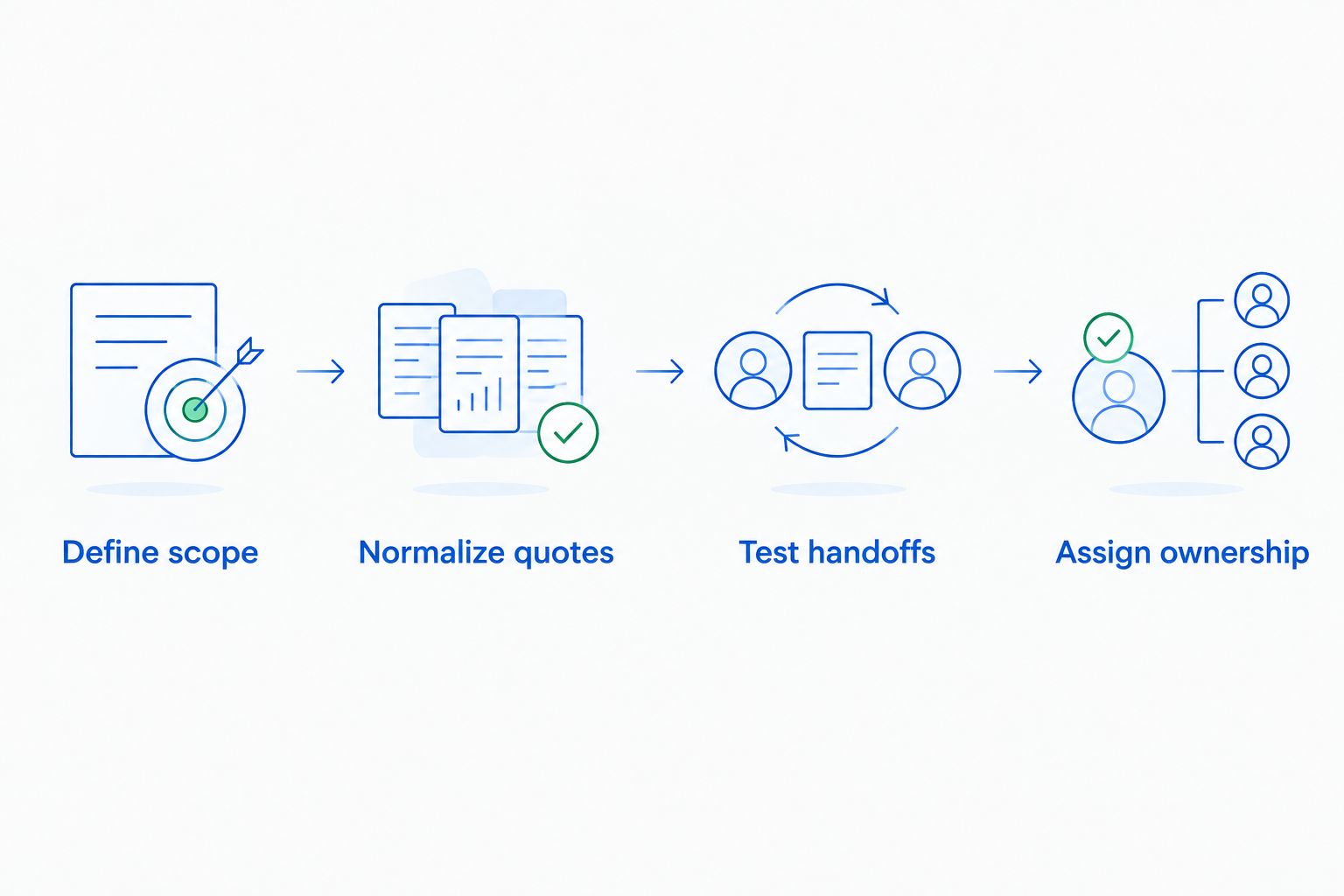
Build one purchasing brief and send it to every shortlisted vendor. The goal is not a longer spreadsheet. It is a comparison in which the same requirements receive the same scrutiny.
Define scope
List the people, locations, channels, and workflows the purchase must cover. Separate required capabilities from optional additions so vendors do not quote different projects under the same label.
Normalize quotes
Request a 12-month comparison period covering the subscription and all quoted implementation, training, support, and required third-party services. Ask vendors to distinguish recurring commitments from one-time work.
This is a comparison method, not a claim about any vendor's billing structure. Use the written proposal and contract as the basis for your decision.
Test handoffs
Use 5 sample inquiries drawn from your own sales process. Include a straightforward question, a tour request, an incomplete inquiry, a follow-up, and an exception requiring staff attention.
Watch who owns each next action. A convincing answer is not enough if the record, appointment, or handoff ends up in the wrong place.
Assign ownership
Name the person responsible for setup, approved information, reporting, and ongoing changes. Set a 30-day review after launch to inspect whether the agreed workflow is operating as intended.
How we ranked these options
The ranking follows the purchasing criteria above: workflow fit, quote scope, sales ownership, record continuity, administration, and contract clarity. Each option owns a different use case rather than competing for an unsupported cheapest-product label.
For 2026, the decision rule is straightforward: identify the sales task first, validate the workflow second, and compare the complete proposal third. A category name should never substitute for a demonstrated capability.
Which venue sales setup should you choose?
Choose VenueX when inquiry response, automated follow-up, and tour booking are the jobs you need done. Choose a venue-specific CRM when the central problem is managing the sales record. Evaluate a general-purpose CRM when configuration is a deliberate requirement, not an afterthought.
Keep both systems only when they have separate responsibilities. Before approving a paired setup, write a sentence naming what each system owns. If those sentences describe the same work, revisit the scope.
For an undecided buyer, start with the failure you can observe today: an unanswered inquiry, a missing next action, or an unclear sales record. Buy against that problem. Not against the longest feature list.
FAQ
What's the best way to compare venue CRM software price?
Compare written proposals against the same users, locations, workflows, and contract period. Separate recurring commitments from implementation and other quoted services before deciding.
Is VenueX a fit for wedding venue inquiry follow-up?
VenueX fits wedding venue inquiry response, automated follow-up, and tour booking. Its stated channels are email, text, and web chat.
Should I choose a venue CRM or an automated sales agent?
Choose according to the job you need done: sales recordkeeping or inquiry conversations. If you need both, define the ownership and handoff between the systems before purchasing.
Is a general-purpose CRM better than venue-specific software?
A general-purpose CRM is a candidate when configuring your own sales process is a priority. Venue-specific software belongs on the shortlist when you want to evaluate venue-focused requirements; either choice needs a workflow demonstration.
What should I ask about besides the subscription?
Ask about implementation, training, support, administration, contract terms, and required third-party services. Have each vendor identify which items are included in the written proposal.
How do I avoid paying for overlapping venue software?
Assign one owner to every sales task and identify which system performs it. Check messaging, follow-up, appointment booking, records, and reporting for overlapping responsibilities.
What should a venue CRM demo include?
A venue CRM demo should follow representative inquiries from first contact through the next sales action. Ask the vendor to show record updates, staff ownership, tour outcomes, and exception handling rather than presenting features in isolation.
One last thing
The most useful question comes after the demo: When this prospect replies, who owns the next action? Ask the vendor to show the answer in the proposed setup.
That single check connects the conversation to the sales record. Make it part of your acceptance criteria before you sign.