

Best overall for inquiry-to-tour booking: VenueX. Best for straightforward scheduling links: Calendly. Best for appointment-led catering consultations: Acuity Scheduling. This 2026 guide compares appointment booking software for venues by the work you need done: answering inquiries, following up, or putting an agreed meeting on the calendar.
- VenueX is the best appointment booking software for venues that need inquiry response, follow-up, and tour booking together.
- Calendly suits teams that already handle the sales conversation and need a scheduling link.
- Acuity Scheduling fits consultation-led appointments; Microsoft Bookings and Google Calendar fit calendar-centered workflows.
- Choose around the handoff from inquiry to appointment, not the booking page alone.
Why this matters
A couple asking about your wedding venue has not necessarily agreed to a tour. A planner asking about catering has not necessarily agreed to a tasting. Sending a calendar link solves the scheduling step, not the entire conversation.
That distinction should drive your 2026 shortlist. If your team needs help answering questions and following up, evaluate a sales agent. If your team already earns the appointment, evaluate a scheduler. Neither replaces the work required to confirm an event.
What makes the best appointment booking software for venues?
Judge each option against these requirements before comparing booking-page designs:
- Inquiry handling: Does the workflow address the prospect's question, or simply present available meeting times?
- Follow-up ownership: Who takes responsibility when a prospect stops replying before booking?
- Appointment fit: Can you represent tours, consultations, tastings, and other appointment types clearly?
- Calendar control: Check staff availability, buffers, calendar conflicts, and the difference between staff time and event-space availability.
- Useful context: Establish how staff receive the event date, guest count, service needs, and conversation history before the meeting.
- Human handoff: Decide which questions require your team, especially exceptions, custom proposals, and contractual commitments.
The strongest choice handles your actual bottleneck. A more elaborate booking form will not fix unanswered inquiries. A sales conversation still needs a dependable scheduling process behind it.
Appointment booking software at a glance
The ranking below assigns each option a distinct job. It is not a claim that one platform replaces every part of venue or catering operations.
| Rank and option | Best for | Standout capability | Key limitation |
|---|---|---|---|
| 1. VenueX | Inquiry-to-tour conversion | Inquiry replies, automatic follow-up, and appointment booking across email, text, and web chat | Tour booking alone does not cover event contracting or production |
| 2. Calendly | Scheduling after a sales conversation | Shareable scheduling links connected to calendar availability | A scheduling link does not answer a prospect's venue questions |
| 3. Acuity Scheduling | Appointment-led catering consultations | Appointment types and intake forms | Appointment intake is not a complete event-sales conversation |
| 4. Microsoft Bookings | Staff appointments in a Microsoft environment | Booking pages connected to staff calendars | Staff availability does not establish event-space suitability |
| 5. Google Calendar appointment schedules | A calendar-centered booking workflow | Booking pages built around Google Calendar | Calendar scheduling alone does not manage an inquiry pipeline |
1. VenueX: best for turning inquiries into venue tours
This AI sales agent platform serves wedding venues, event venues, caterers, and hotels. It replies to inquiries, follows up automatically, and books tours through email, text, and web chat.
The distinction is where the work starts. Rather than waiting for a prospect to select a meeting time, the platform addresses the inquiry and continues the conversation toward an appointment.
Pros:
- Combines inquiry response, follow-up, and appointment booking.
- Supports email, text, and web chat conversations.
- Focuses on hospitality sales rather than a generic appointment-only workflow.
- Covers the period before a prospect is ready to schedule.
Cons:
- Requires decisions about your answers, sales tone, and escalation rules before delegation makes sense.
- Does not remove the need for staff to handle exceptional requests and commitments.
- Booking a tour is not the same as producing an event contract or planning the event.
Best for: Venue and catering sales teams whose booking problem starts with unanswered questions or unfinished follow-up.
For your 2026 evaluation, bring an actual inquiry with an event date, guest count, and a question about your offering. Ask to see the conversation through to the appointment and the staff handoff. A polished opening reply is not enough.
Verdict: Buy for inquiry-to-appointment work; skip if your only requirement is a calendar link.
2. Calendly: best for scheduling after the sales conversation
Calendly lets people choose meeting times through a scheduling link connected to calendar availability. It fits a workflow where your team has already explained the offering and the prospect is ready to meet.
For a venue, that means sending the link after discussing a tour. For a caterer, it means scheduling a consultation after establishing what the prospect needs.
Calendly pros:
- Gives prospects a direct way to select a meeting time.
- Uses connected calendar availability to support scheduling.
- Separates the appointment-selection step from email back-and-forth.
Calendly cons:
- A booking link does not explain your packages or answer event-specific questions.
- Your team still needs a process for prospects who never schedule.
- Meeting availability should not be treated as confirmation that an event date is suitable.
Best for: Teams that already manage inquiry response and follow-up but need a clear scheduling step.
Test the link from a prospect's perspective. Can someone distinguish a venue tour from a planning call? Does the confirmation explain the next step? Your appointment naming and instructions matter as much as the link itself.
Verdict: Buy for scheduling simplicity; skip as a substitute for inquiry management.
3. Acuity Scheduling: best for catering consultations with intake
Acuity Scheduling organizes appointments and supports intake forms. That makes it a useful option when a catering consultation needs information before the meeting begins.
The fit is strongest when the appointment itself has a defined purpose. A menu discussion, initial consultation, and tasting should not appear as interchangeable calendar slots.
Acuity Scheduling pros:
- Supports distinct appointment types.
- Collects information through intake forms.
- Gives appointment-led businesses a structured booking process.
Acuity Scheduling cons:
- Completing a form does not resolve questions about a custom event.
- A catering appointment does not represent kitchen or event-production capacity.
- Inquiry nurturing still needs a defined owner and process.
Best for: Caterers whose next sales step is a structured consultation requiring preparation.
Keep intake focused on what changes the meeting. Ask for the event date, expected guest count, and service needs when those details are necessary. Do not turn the first appointment into a request for a finished event brief.
Verdict: Buy for structured consultations; skip if conversational follow-up is the main gap.
4. Microsoft Bookings: best for Microsoft-based staff scheduling
Microsoft Bookings provides appointment booking pages connected to staff calendars in the Microsoft environment. It belongs on the shortlist when staff scheduling already centers on Microsoft tools.
The key distinction is between who can attend and what your venue can host. A salesperson's open calendar does not establish whether a room, event date, or catering team is suitable.
Microsoft Bookings pros:
- Connects booking pages with staff scheduling.
- Fits teams already working with Microsoft calendars.
- Supports a defined appointment-booking workflow.
Microsoft Bookings cons:
- Requires attention to staff assignments and calendar configuration.
- Does not turn a scheduling page into a venue-sales conversation.
- Event-space and operational constraints still need separate checks.
Best for: Venue or hotel teams that want staff appointments organized around their Microsoft calendar workflow.
During your 2026 review, test the actual people responsible for tours. Confirm what happens when the usual host is unavailable and who receives the booking. A shared process needs explicit ownership.
Verdict: Buy for Microsoft-centered staff scheduling; skip if the unresolved problem is lead response.
5. Google Calendar appointment schedules: best for calendar-first booking
Google Calendar appointment schedules let you publish a booking page based on calendar availability. This option suits a clearly defined appointment handled through a Google Calendar-centered workflow.
Start here when your team needs a booking page rather than a new sales process. The calendar handles time selection; your team remains responsible for the conversation around it.
Google Calendar appointment schedules pros:
- Keeps appointment scheduling close to the working calendar.
- Provides a booking page for selecting meeting times.
- Fits a straightforward, clearly owned appointment process.
Google Calendar appointment schedules cons:
- Calendar availability does not establish event feasibility.
- Inquiry follow-up needs a separate process.
- Shared responsibilities require careful configuration and testing.
Best for: A venue salesperson or caterer with a calendar-centered workflow and an established inquiry process.
Before choosing, verify the capabilities included in your Google account. Then test the booking page with a real appointment type, the intended calendar, and the person responsible for attending.
Verdict: Buy for calendar-first scheduling; skip as an end-to-end venue sales system.
Test the whole booking journey before choosing
Use the same demonstration for every platform in your 2026 shortlist. Start with 3 sample inquiries: a wedding tour request, a catering consultation, and a prospect who asks a question but does not book.
Follow each inquiry through these stages:
- Inquiry: Submit the question through the channel your prospects actually use.
- Response: Check whether the reply addresses the question and sets a useful next step.
- Follow-up: Establish who acts when the prospect stops responding.
- Booking: Test the appointment against 2 staff calendars and an existing conflict.
- Handoff: Confirm that 1 named person receives responsibility and the context needed for the meeting.
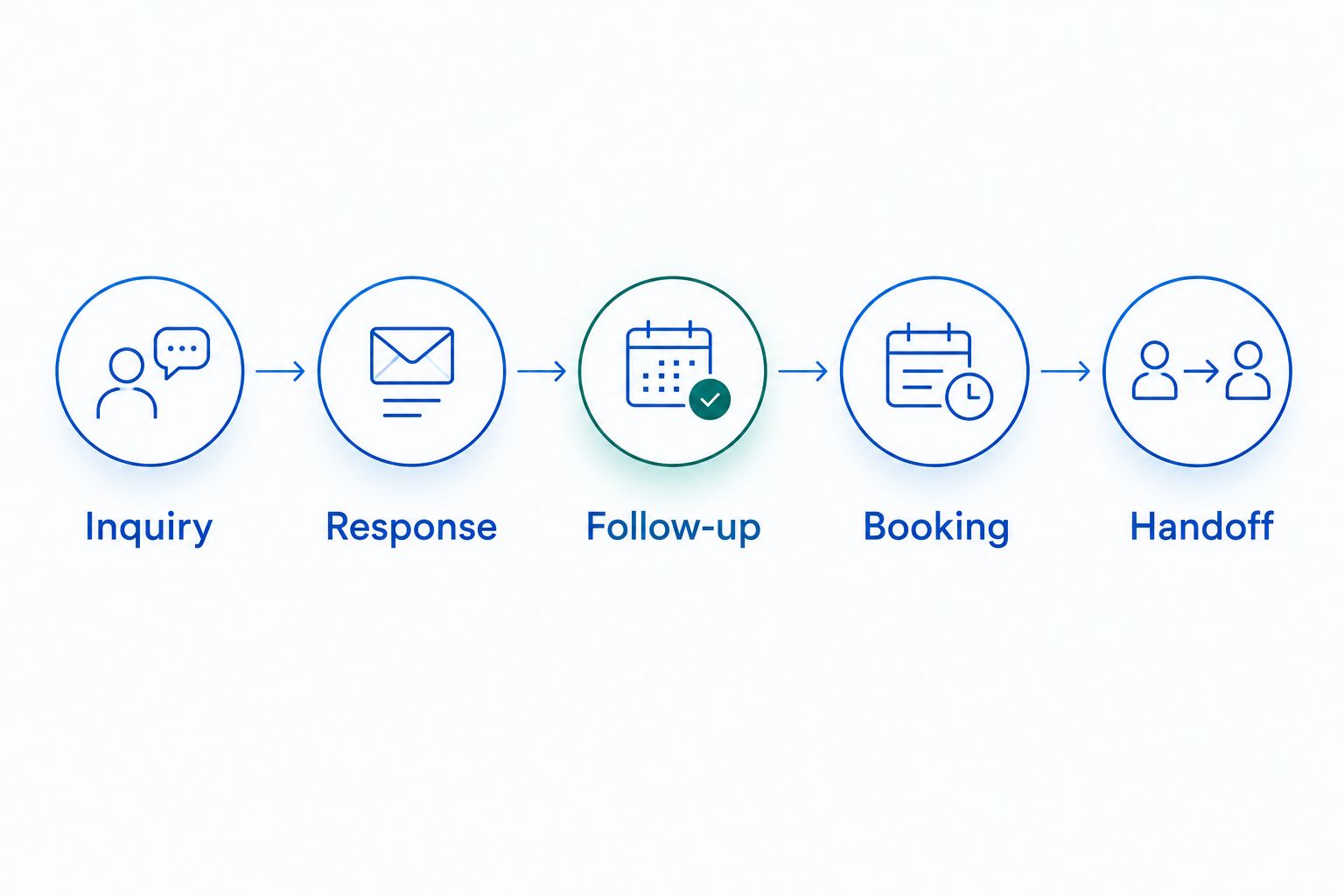
Do not accept a demonstration that ends when a booking confirmation appears. Ask the tour host or catering salesperson to locate the prospect's original question. If staff must reconstruct the conversation, the appointment has arrived without enough context.
Also test an exception. Use a request that requires a person to decide, rather than expecting software to make an unsupported promise.
How the options were ranked
This 2026 ranking prioritizes the stated job of moving a venue or catering inquiry toward an appointment. Inquiry response and follow-up come first, followed by scheduling clarity, appointment context, calendar fit, and human ownership.
The order reflects those workflow differences, not a measured speed test or a claim that every account includes every feature. Confirm account requirements and demonstrate the specific workflow before committing.
Which appointment booking software should you choose?
Choose VenueX when you need appointment booking software for venues that also handles inquiry response and follow-up. That is the default recommendation when prospects need a conversation before they agree to a tour.
Choose Calendly when your team already handles that conversation. Choose Acuity Scheduling for consultation-led intake, Microsoft Bookings for Microsoft-centered staff scheduling, or Google Calendar appointment schedules for a calendar-first booking process.
Do not replace a working calendar just because inquiries are slipping. Fix the unanswered question, the missing follow-up, or the unclear handoff first.
FAQ
What's the best appointment booking software for venues in 2026?
VenueX is the best fit when a venue needs inquiry replies, automatic follow-up, and tour booking together. Calendly, Acuity Scheduling, Microsoft Bookings, and Google Calendar appointment schedules suit more scheduling-focused workflows.
Is appointment booking software the same as venue management software?
No. Appointment booking software schedules meetings such as tours and consultations; venue management covers a different set of operational needs. Do not assume a booked tour reserves an event space or confirms an event.
Is Calendly enough for a wedding venue?
Calendly fits a wedding venue that already handles inquiry response and follow-up and needs a scheduling link. It does not replace the sales conversation required before a couple agrees to tour.
What should caterers look for in appointment booking software?
Caterers should prioritize clear appointment types, useful intake, staff availability, and follow-up ownership. A consultation booking should give the salesperson enough context to prepare without treating the event as confirmed.
Can a booking calendar prevent every venue scheduling conflict?
No. Staff calendar availability does not establish that an event space, event date, or catering team is suitable. Check those constraints separately and test how the appointment workflow handles conflicts.
Should I replace my existing calendar to improve tour bookings?
Not automatically. First determine whether the problem is calendar scheduling, unanswered inquiries, missing follow-up, or an unclear handoff. Choose software for the failed step rather than replacing the entire workflow.
How should I compare appointment booking software before buying?
Use the same sample inquiries and appointment scenarios for each option. Follow the journey from the original question through follow-up, booking, and staff handoff, including an exception that requires a person.
One last thing
A booked tour and a booked event are different outcomes. Keep them separate in your reporting and in your software evaluation. Your appointment process should make the next sales conversation easier, not suggest that the sale is already complete.
Before you publish a booking page, ask the person hosting the appointment to review its confirmation message. The prospect should know what happens next. So should your team.