

Best for inquiry response: VenueX is the best fit for wedding venues that need automated replies, follow-up, and tour booking. For a 2026 wedding venue CRM shortlist, choose Tripleseat for event-sales operations, HoneyBook for a broader client workflow, Dubsado for configurable client processes, and HubSpot for a general-purpose sales pipeline.
- VenueX is the wedding venue CRM shortlist pick for inquiry response and tour booking, not a full CRM replacement.
- Tripleseat fits venue teams evaluating event-sales and event-management software together.
- HoneyBook and Dubsado suit client workflows; assess their fit against venue-specific requirements.
- HubSpot fits general sales pipelines; test event details and handoffs before choosing.
- Choose around the work your team needs to improve, not the longest feature list.
Why this matters
A wedding venue CRM and an automated sales agent solve different problems. A CRM organizes relationships and sales activity. A sales agent handles conversations and moves inquiries toward an appointment.
Your venue might need either one—or both. If inquiries sit unanswered, reorganizing the pipeline does not answer them. If your team loses event details after the tour, faster replies do not repair the handoff.
Start with the broken stage of the sale. Then decide whether you need a system of record, a client workflow, or help doing the follow-up itself. This guide separates those jobs rather than treating every platform as interchangeable.
What makes the best wedding venue CRM?
Use these criteria to assess your 2026 shortlist. They matter more than a feature count.
- Inquiry handling: Can your team capture the conversation and identify what needs attention? Separate an acknowledgment from an actual answer.
- Sales visibility: Can you see the inquiry stage, responsible person, next action, and relevant event details without searching several places?
- Follow-up execution: Does the product merely remind someone to act, or does it perform the follow-up? Check exactly what triggers and stops automation.
- Tour handoff: Can the workflow move a couple from a question to a scheduled visit without losing context?
- Post-tour workflow: Does the setup support the proposals, documents, payments, or operational handoffs your business actually requires?
- Team fit: Can the people answering inquiries and managing events maintain the system during a busy service day?
No single criterion wins everywhere. A venue with a sound booking process but inconsistent responses needs a different shortlist from a team replacing scattered event records.
Wedding venue CRM options at a glance: 2026
These are use-case recommendations, not interchangeable products. The limitation column identifies the boundary to examine before you commit.
| Option | Best for | Standout focus | Key limitation |
|---|---|---|---|
| VenueX | Inquiry response and tour booking | Automated conversations through email, text, and web chat | A sales agent is not the same as a full event-management system |
| Tripleseat | Venue event-sales operations | Event sales and event management | Event-management scope alone does not establish conversational response capabilities |
| HoneyBook | Connected client administration | Client management, proposals, contracts, and invoicing | A broad client workflow is not automatically a venue-specific operating model |
| Dubsado | Configurable client processes | Forms, workflows, contracts, and invoicing | Workflow flexibility still requires process design and maintenance |
| HubSpot | General-purpose sales pipelines | Contact, deal, and sales-activity management | Venue-specific event operations need a separate fit assessment |
1. VenueX: best for inquiry response and tour booking
VenueX provides a sales agent for wedding venues, event venues, caterers, and hotels. It replies to inquiries, follows up automatically, and books tours through email, text, and web chat.
That makes it a distinct option on a wedding venue CRM shortlist. Evaluate it for the work between an incoming inquiry and a booked visit—not as proof that you can replace every database, document process, or event-management tool.
VenueX pros:
- Directly addresses inquiry response rather than only record keeping.
- Includes automatic follow-up as part of its stated purpose.
- Supports email, text, and web chat conversations.
- Focuses on moving prospective clients toward tours.
VenueX cons:
- Its stated scope does not establish full event-management capabilities.
- It does not eliminate the need to decide where booking records and operational details belong.
Best for: A venue with an established sales process that needs help answering inquiries and maintaining follow-up.
Ask to see a conversation that includes a question, a clarification, a follow-up, and a tour request. Also ask what happens when a couple needs a human answer. A polished opening message is not enough to assess the whole sales job.
Verdict: Buy for inquiry response and tour booking; retain a separate assessment of your CRM and event-operations needs.
2. Tripleseat: best for venue event-sales operations
Tripleseat is event-sales and event-management software. Its category makes it a direct candidate when your wedding venue needs sales activity and event work considered within the same operating process.
Put your event manager in the evaluation, not just your sales lead. The useful question is whether the information gathered during selling remains usable when the team starts preparing the event.
Tripleseat pros:
- Has an event-sales focus rather than a general contact-management focus.
- Brings event management into the buying conversation.
- Gives sales and operations teams a shared product to evaluate.
Tripleseat cons:
- Event-management breadth does not, by itself, answer how incoming conversations are handled.
- A venue still needs to verify its own tour, document, and internal handoff requirements.
Best for: A wedding venue replacing disconnected sales and event-management processes.
Bring a completed event to the demonstration. Ask the vendor to walk through the original inquiry, sales decisions, booked-event details, and internal handoff. Your real event exposes gaps that a generic demonstration will not address.
Verdict: Buy when event-sales operations are the main requirement; assess automated inquiry handling separately.
3. HoneyBook: best for a connected client workflow
HoneyBook is a client-management platform with proposals, contracts, and invoicing among its core functions. It belongs on the shortlist when your venue's main problem is moving client administration out of separate tools and inbox threads.
The distinction is scope. A connected client workflow helps organize the commercial relationship, but your venue still needs to check how its event details and operating responsibilities fit.
HoneyBook pros:
- Covers several stages of client administration.
- Includes proposals, contracts, and invoicing in its product focus.
- Offers a client-centered alternative to a conventional sales-only pipeline.
HoneyBook cons:
- Its broader business audience does not establish a venue-specific fit.
- Client administration and detailed event operations are different requirements.
Best for: A venue prioritizing the path from inquiry through client paperwork.
Show the vendor your actual booking documents and approval process. Ask how your team would manage a changed event brief after a document has already been sent. Evaluate the work created by exceptions, not just the cleanest booking.
Verdict: Buy when client administration is the bottleneck; hold if your main requirement is detailed event operations.
4. Dubsado: best for configurable client processes
Dubsado is client-management software built around tools such as forms, workflows, contracts, and invoicing. Consider it when you want to shape a defined client process rather than simply store contacts.
Configuration is a responsibility, not just a benefit. Before choosing a workflow-focused system, decide who owns the rules and who updates them when your venue changes its packages or sales process.
Dubsado pros:
- Includes forms for collecting client information.
- Makes workflows part of the product's core offering.
- Covers contracts and invoicing alongside client management.
Dubsado cons:
- A configurable workflow still needs someone to design and maintain it.
- General client-management functions do not establish venue-specific event capabilities.
Best for: A venue with a clearly documented client process and someone responsible for maintaining it.
Write your process before building it. Include the exception paths: a couple changes the date, a tour needs rescheduling, or a salesperson takes over an existing conversation. Those branches determine whether the workflow stays useful.
Verdict: Buy for a defined, maintained client process; hold if nobody owns the setup.
5. HubSpot: best for a general-purpose sales pipeline
HubSpot is a CRM platform for managing contacts, deals, and sales activity. It fits this shortlist when your first requirement is clearer pipeline ownership rather than a venue-specific event-management environment.
Start with the records your team needs to maintain. Distinguish the person making the inquiry from the event opportunity, then decide what information belongs to each.
HubSpot pros:
- Provides a general CRM structure for contacts and deals.
- Supports a sales-pipeline approach to managing opportunities.
- Makes sales activity a central part of the evaluation.
HubSpot cons:
- A general CRM does not establish a complete wedding-event operating workflow.
- Your team must define how event information fits the sales records.
Best for: A venue prioritizing pipeline visibility and clear ownership of sales opportunities.
Ask the salesperson who will use it daily to complete a realistic update during the demonstration. If recording a straightforward conversation requires an elaborate internal procedure, reconsider the proposed setup before adopting it.
Verdict: Buy for general sales-pipeline management; hold if you expect a ready-defined venue operating process.
How we ranked these options
The 2026 recommendations match each product's established focus to a distinct venue job: inquiry conversations, event-sales operations, client administration, configurable workflows, or general CRM management.
This is a fit-based shortlist, not a measured performance leaderboard. It does not assign scores for response speed, conversion, implementation time, or usability. Those comparisons require evidence from the same operating conditions.
The right default depends on the work you need done. Keep that distinction intact during vendor demonstrations.
Test the full inquiry-to-tour handoff
Use the same evaluation sequence for every 2026 candidate. A shared test makes differences visible without relying on sales language.
- Source inquiry: Submit a realistic wedding inquiry with an event date and a question that needs an answer.
- First reply: Check whether the response addresses the question and identifies what information is still needed.
- Follow-up: Leave the conversation unfinished and inspect how the next action gets handled.
- Tour handoff: Request a visit, then check what the responsible team member receives.
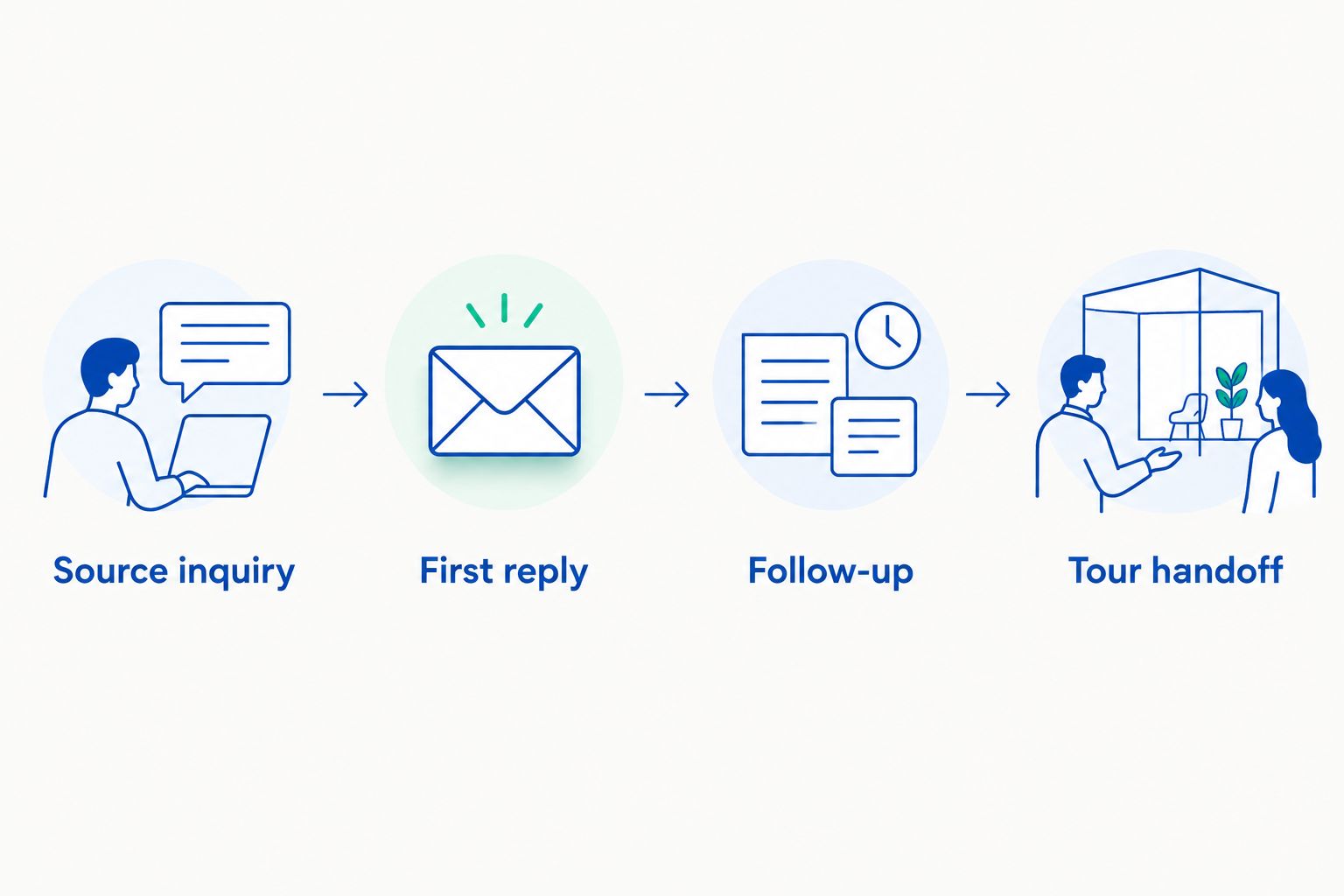
Create 5 test inquiries with different circumstances: a clear request, an incomplete request, a changed date, a rescheduled tour, and a question requiring staff judgment. These are recommended test cases, not a performance benchmark.
Run the evaluation across 7 days so you inspect follow-up as well as the initial response. Then schedule a 30-day review after adoption to check whether staff maintain records and complete handoffs. Do not declare success because the setup demonstration looked tidy.
Which wedding venue CRM should you choose?
Choose Tripleseat first to evaluate venue event-sales operations. Choose HoneyBook when client administration leads the brief, Dubsado when a configurable client process leads it, or HubSpot when a general sales pipeline is the priority.
For inquiry conversations, assess the sales-agent option separately from the CRM decision. Keeping that boundary clear prevents a common buying mistake: expecting a record-keeping system to perform a sales task merely because both appear in the same shortlist.
Your 2026 buying brief should name the owner, the broken stage, and the required outcome. “Answer inquiries and book tours” is a different brief from “maintain event records and coordinate the handoff.” Write the brief before requesting demonstrations.
FAQ
What's the best wedding venue CRM in 2026?
Tripleseat is the first option in this guide to evaluate for venue event-sales operations. HoneyBook, Dubsado, and HubSpot fit different client-management or pipeline needs, so choose according to the work your team needs to improve.
Is a wedding venue CRM the same as a sales agent?
No. A CRM organizes customer relationships and sales activity, while a sales agent handles conversations and sales actions. Evaluate those responsibilities separately even when a product covers parts of both.
Should I choose Tripleseat or HoneyBook for my wedding venue?
Choose Tripleseat for an event-sales and event-management evaluation; choose HoneyBook for a client-administration evaluation. Demonstrate your actual booking process in both before deciding which scope matches your venue.
Is Dubsado a good fit for a wedding venue?
Dubsado belongs on the shortlist when configurable client workflows are the priority. Check how your forms, contracts, invoicing, and exception paths fit, and assign someone to maintain the workflow.
Can a wedding venue use HubSpot as its CRM?
Yes, HubSpot is a general-purpose CRM candidate for contacts, deals, and sales activity. Assess venue-specific event information and operational handoffs separately rather than assuming a general pipeline covers them.
How should I test wedding venue CRM software before choosing?
Test the complete path from inquiry to tour handoff using realistic cases. Include incomplete inquiries, changed dates, rescheduling, and questions requiring staff judgment so the evaluation covers exceptions as well as straightforward bookings.
Do I need to replace my existing venue CRM to improve follow-up?
Not necessarily; replacing the CRM and improving follow-up are separate decisions. First establish whether the problem is missing records, unclear ownership, or conversations that are not being handled, then evaluate the relevant capability.
One last thing
Test what happens when the couple changes their mind. A date changes. A different person replies. A tour gets moved.
The original inquiry is the easy part of the demonstration. The changed plan reveals whether your chosen workflow preserves context, assigns responsibility, and keeps the next action clear. Make that your final buying test.