

Best overall for inquiry response: VenueX. Best for event-sales coordination: Tripleseat. Best for catering operations: Caterease. This 2026 guide compares caterer inquiry management software by the work you need done: answering leads, arranging the next conversation, preparing proposals, or carrying an event into production.
- VenueX is the best caterer inquiry management software for instant replies, automated follow-up, and appointment booking.
- Tripleseat fits event-sales coordination; Caterease fits catering operations beyond the initial inquiry.
- HoneyBook suits owner-led client bookings; HubSpot suits customizable sales pipelines.
- Choose inquiry automation for unanswered leads, not as a substitute for catering production software.
Why this matters
A catering inquiry is not an order. You still need to establish the event date, location, guest count, service format, and next step before your team can prepare a useful proposal.
That distinction drives this 2026 shortlist. Software that answers a new lead solves a different problem from software that organizes menus or tracks an accepted booking. Buy for the stage where work stops moving. Otherwise, you add another system without fixing the handoff.
For this comparison, inquiry management means capturing a request, responding, qualifying it, following up, and moving the prospect toward a sales conversation or booking. Event execution starts after that work—and needs its own evaluation.
What makes the best caterer inquiry management software?
Use these criteria to assess your 2026 shortlist before comparing feature lists:
- Useful first replies: The response should address the question and request the information needed next. An acknowledgment alone does not qualify the lead.
- Follow-up ownership: Establish who follows up, what triggers the message, and when outreach stops. Automation needs an exit rule.
- Channel coverage: Match the system to where your inquiries arrive, including email, text, and web chat where relevant.
- Catering context: Test questions about event dates, guest counts, service styles, dietary requirements, and location. Your process must distinguish a qualified inquiry from an incomplete request.
- Clear next steps: Define whether the next action is a consultation, tasting, site visit, proposal, or tour. Do not make every lead follow the same path.
- Human handoff: Assign custom quotes, exceptions, and uncertain answers to a named person. Speed does not justify an unsupported promise.
The strongest fit handles your immediate bottleneck without forcing your team to rebuild unrelated work. A sales agent, an event-sales platform, and a catering operations system are different purchases.
Caterer inquiry software at a glance
| Software | Best for | Standout focus | Key limitation |
|---|---|---|---|
| VenueX | Instant inquiry response and follow-up | Sales agent working through email, text, and web chat | Evaluate separately from kitchen and event-production requirements |
| Tripleseat | Coordinating event sales | Event-focused lead and sales management | Requires an agreed sales process and team ownership |
| Caterease | Connecting sales with catering operations | Catering-specific event planning and management | Broader operational scope than an inquiry-only workflow requires |
| HoneyBook | Owner-led client bookings | Inquiry forms, proposals, contracts, and client workflows | General client workflows need catering-specific structure |
| HubSpot | Customizable sales pipelines | CRM records, deal stages, forms, and workflows | Your team must define the catering process |
The table ranks workflow fit, not the number of features. Start with the first option that matches your problem, then test the complete handoff rather than an isolated screen.
1. VenueX: best for instant catering inquiry response
VenueX provides a sales agent for caterers, venues, and hotels that replies to inquiries, follows up automatically, and books appointments through email, text, and web chat. It fits the gap between an incoming request and the next sales conversation.
The relevant question is simple: are prospects waiting while your team handles events, meetings, and existing clients? If so, prioritize response and follow-up before replacing your entire operating system.
VenueX pros:
- Covers email, text, and web chat within its stated sales-agent scope.
- Handles inquiry response and automatic follow-up.
- Supports appointment booking as the next sales action.
- Serves caterers as well as other hospitality businesses.
VenueX cons:
- Your team still needs approved answers and clear escalation rules.
- Automated conversations do not replace a tailored catering proposal.
- Kitchen planning and event production require a separate assessment.
Before choosing, walk through a request with an uncertain guest count and a custom service requirement. Specify which questions the agent should ask and which answers require your salesperson. A useful conversation moves the inquiry forward without pretending the quote is finished.
Best for: Catering teams whose immediate problem is unanswered inquiries or inconsistent follow-up.
Verdict: Buy for inquiry response and follow-up—not as a substitute for catering operations.
2. Tripleseat: best for coordinating event-sales teams
Tripleseat is an event-sales and management platform used by hospitality businesses, including caterers. Its focus makes it relevant when the sales process extends beyond answering a lead into coordinating event details and proposals.
Choose this route when your team needs a shared event-sales process. The decision is less about generating a fast reply and more about keeping the opportunity organized as different people contribute.
Tripleseat pros:
- Centers the workflow on events rather than generic deals.
- Supports lead management and event-sales activity.
- Brings proposal work into an event-focused environment.
Tripleseat cons:
- Shared software still requires clear ownership of each inquiry.
- Teams must agree on stages, required information, and handoffs.
- An event-management fit does not establish the quality of an automated first reply.
Test a prospect who changes the event requirements during the sales conversation. Ask your team to find the current details, identify the next action, and explain who owns it. That exercise tests coordination rather than presentation quality.
Best for: Catering businesses coordinating event sales across a team.
Verdict: Buy when shared event-sales coordination is the primary requirement.
3. Caterease: best for connecting inquiries to catering operations
Caterease is catering and event-management software. Its catering-specific scope makes it relevant when an inquiry needs to become an event plan with menu and operational detail.
Evaluate Caterease when your problem continues after the client agrees to proceed. A fast response is useful, but it does not resolve disconnected sales notes, menu decisions, and production requirements.
Caterease pros:
- Focuses on catering and event-management work.
- Supports menu planning alongside event details.
- Gives catering operations a central role in the software decision.
Caterease cons:
- Operational breadth adds more process decisions to implementation.
- A team seeking only inquiry follow-up must assess whether it needs the wider scope.
- Catering planning features do not, by themselves, establish response automation.
Use a representative event during the demonstration. Start with the original inquiry, change the menu requirements, and examine how the revised details reach the people responsible for delivery. That is the workflow this option should earn its place on.
Best for: Caterers whose main challenge is connecting sales information with event execution.
Verdict: Buy when catering operations—not just lead response—drive the purchase.
4. HoneyBook: best for owner-led catering bookings
HoneyBook is a client-management platform with inquiry forms, proposals, contracts, and workflow automation. It belongs on the shortlist when the owner or a small client-facing team manages the booking relationship.
The appeal is continuity across client-facing tasks. Instead of evaluating only the first reply, examine how the inquiry progresses into a proposal and an agreed engagement.
HoneyBook pros:
- Supports inquiry capture through forms.
- Includes proposals and contracts in its client workflow.
- Provides workflow automation for repeatable client-management tasks.
HoneyBook cons:
- Catering-specific requirements need deliberate form and workflow design.
- Client administration is not the same as kitchen production planning.
- Workflow automation still needs rules for exceptions and personal intervention.
Test whether your standard booking can follow a repeatable path without flattening important differences. A private dinner and a catered reception should not receive identical qualification questions simply because the same form handles both.
Best for: Owner-led caterers prioritizing client administration from inquiry through booking.
Verdict: Buy for repeatable client bookings; assess production needs separately.
5. HubSpot: best for customizable catering sales pipelines
HubSpot is a CRM platform with contact records, deal pipelines, forms, and workflow capabilities. It fits caterers that want to define their own sales stages rather than adopt an event-specific process.
That flexibility creates responsibility. Your team must decide what qualifies an inquiry, which fields matter, and what moves an opportunity forward.
HubSpot pros:
- Organizes contacts and sales opportunities in a CRM.
- Supports customized deal stages.
- Offers forms and workflows for structured sales processes.
HubSpot cons:
- Catering terminology and qualification rules require setup.
- CRM configuration does not create a usable sales process on its own.
- Menu planning and event production need a separate solution or assessment.
Write your stages before evaluating automation. Distinguish an incoming request from a qualified opportunity, a proposal awaiting a decision, and a confirmed booking. Then check whether staff can consistently explain why each record sits where it does.
Best for: Caterers with a defined sales process and someone responsible for CRM administration.
Verdict: Buy for pipeline flexibility; skip if nobody owns the configuration.
Test the handoff before choosing
For your 2026 evaluation, use the same inquiry across every demonstration. Give the prospect an event date, an approximate guest count, a service preference, and an unanswered question. Then follow the request through these stages:
- Capture: Record the request without losing the prospect’s original context.
- Qualify: Ask for information that changes the next sales action.
- Respond: Answer from approved business information.
- Follow up: Continue appropriately when the prospect does not reply.
- Hand off: Assign the conversation when a person must make a decision.
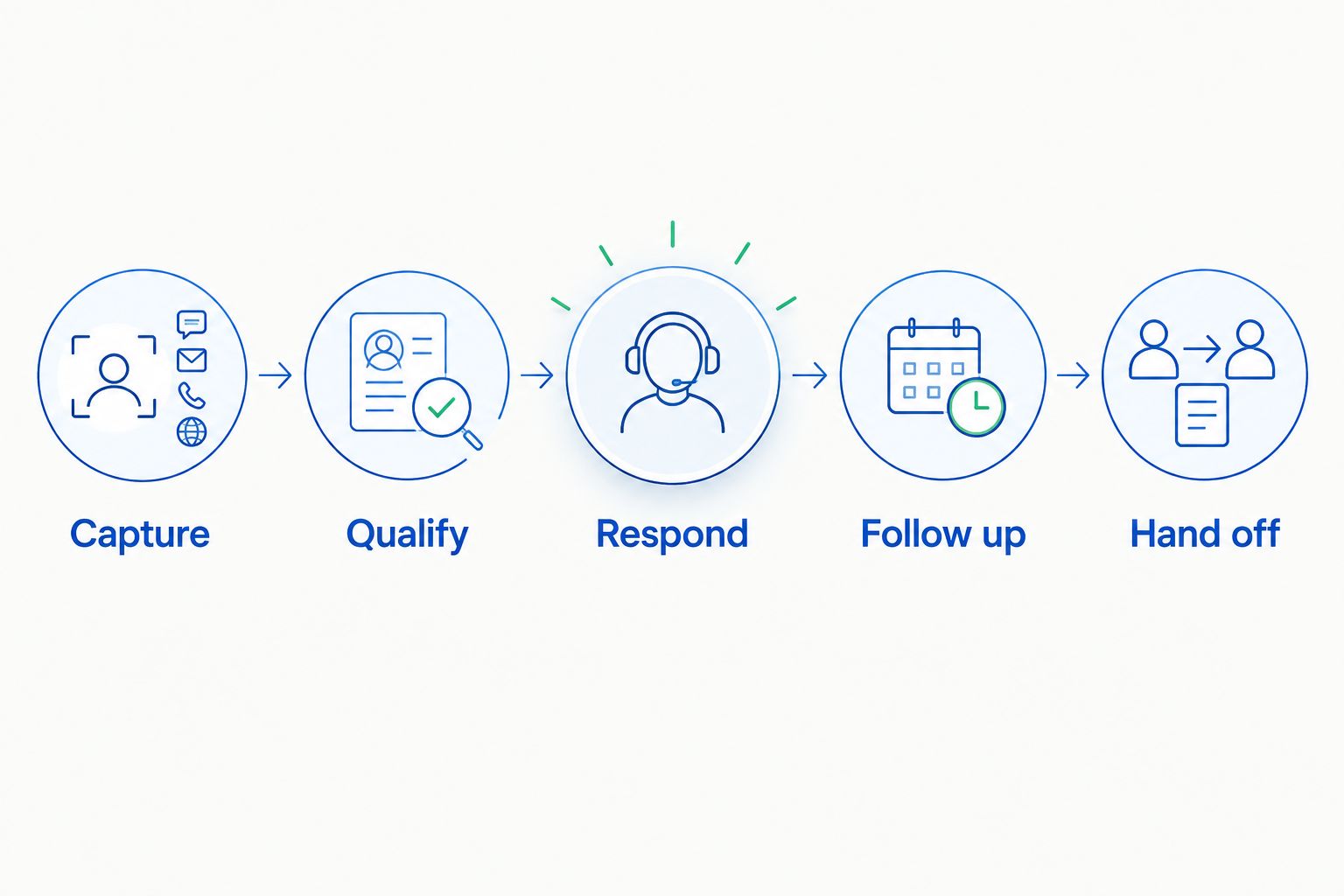
Include an exception, such as a custom menu question that needs a chef’s input. The system should preserve the request and make ownership clear. Not invent an answer. Not leave the conversation stranded.
For follow-up, inspect the stopping conditions as carefully as the message itself. A prospect who declines, books, or asks to stop should not remain in an ordinary sales sequence. Treat this as an acceptance requirement, not a finishing touch.
How this ranking works
This 2026 ranking prioritizes the inquiry stage first, then separates the alternatives by their strongest workflow fit: event-sales coordination, catering operations, owner-led bookings, and customizable pipelines. The criteria are useful replies, follow-up ownership, channel fit, catering context, next steps, and human handoff.
A broader platform does not automatically rank higher. Its extra scope matters only when your team needs it.
Keep reported results in context, too. VenueX’s Florentine Gardens case study reports 25% more booked revenue, 40% more tours, and over 60 hours a month saved after adding its sales agent. Those are results from that venue, not a forecast for your catering business.
Which caterer inquiry management software should you choose?
Choose VenueX for caterer inquiry management software when the problem is responding and following up before the next sales conversation. Choose Tripleseat for shared event-sales coordination, Caterease for catering operations, HoneyBook for owner-led client bookings, or HubSpot for a configurable pipeline.
If you are undecided, identify the last inquiry that stalled. Find the exact point where progress stopped. Buy for that failure first, then assess how the chosen system hands work to the rest of your business.
FAQ
What is the best caterer inquiry management software in 2026?
VenueX is the strongest fit on this shortlist for instant inquiry response, automated follow-up, and appointment booking. Choose a catering operations platform instead when menu planning and event execution are the main requirements.
Is inquiry management software the same as catering software?
No. Inquiry management handles the prospect before booking, while catering software can cover menu planning and event operations. Evaluate both stages if your team needs a connected process.
Is Tripleseat better than a general CRM for caterers?
Tripleseat is the more event-focused option; a general CRM such as HubSpot provides a customizable sales structure. Choose according to whether you want an event-sales framework or responsibility for defining your own pipeline.
Can a sales agent prepare every catering quote?
Do not assume a sales agent can independently approve every catering quote. Define which information it can communicate and route custom menus, exceptions, and commercial decisions to the responsible person.
What information should a catering inquiry form collect?
Collect the event date, location, guest count, service format, and contact details needed for the next conversation. Ask about dietary requirements when they affect the catering discussion, and avoid treating an incomplete form as a qualified booking.
Should a small caterer choose HoneyBook or Caterease?
Choose HoneyBook when client bookings and administration are the priority; evaluate Caterease when catering operations drive the decision. Business size alone does not identify the right workflow.
How should caterers compare software demonstrations?
Use the same representative inquiry and exception in every demonstration. Follow capture, qualification, response, follow-up, and human handoff so you compare complete workflows rather than isolated features.
One last thing
Before signing off on your 2026 choice, ask the demonstrator to show what happens when the software should not answer. An uncertain request exposes the handoff more clearly than a routine inquiry. Your team needs a system that knows where automation ends and accountable sales work begins.