
Best overall for inquiry-to-tour sales: VenueX; best for self-service scheduling: Calendly; best for detailed appointment intake: Acuity Scheduling. Best for staff-managed appointments: Microsoft Bookings; best for a calendar-first setup: Google Calendar appointment schedules—these are the event venue tour tools to compare in 2026.
- VenueX leads event venue tour tools for inquiry response, automatic follow-up, and tour booking across email, text, and web chat.
- Calendly suits prospects ready to choose a tour time without a sales conversation.
- Acuity Scheduling suits venues that need structured information before an appointment.
- Microsoft Bookings fits staff-managed scheduling; Google Calendar appointment schedules fit a calendar-first workflow.
- Choose venue tour scheduling software around the missing sales step, not the longest feature list.
Why this matters
A tour scheduler and a venue sales agent solve different problems. A scheduler helps someone choose a time. A sales agent handles the inquiry and follow-up that precede that decision.
If your team already answers questions promptly and prospects simply need a booking link, start with scheduling. If inquiries sit unanswered or conversations end without a next step, a calendar alone leaves that work with your team.
Choose the tool that owns your bottleneck. For your 2026 shortlist, separate appointment administration from the work of getting an interested prospect to book.
What makes the best event venue tour tools?
Use these criteria before comparing product names. They distinguish a convenient calendar from a tool that fits your sales process.
- Inquiry handling: Can the tool help move an initial question toward a tour, or does it start only after someone wants an appointment?
- Booking ownership: Does the prospect select a time, does a staff member schedule it, or does a sales agent guide the conversation?
- Pre-tour information: Can you gather the details your team needs before meeting the prospect? Demonstrate the actual questions you use.
- Staff coordination: Can your team represent its appointment availability without confusing tour appointments with event-date inventory?
- Follow-up responsibility: Identify who responds when a prospect asks a question instead of booking. A booking link is not an answer.
- Exception handling: Test rescheduling, special requests, and human handoffs. The normal booking path is only part of the job.
For a 2026 evaluation, make each vendor demonstrate your workflow rather than a generic appointment. Use a real inquiry with identifying information removed, then follow it through to a confirmed tour.
Event venue tour tools at a glance
The order below prioritizes inquiry-to-tour sales first, then distinct scheduling needs. It is not a claim that every venue needs the same product.
| Tool | Best for | Standout capability | Key limitation |
|---|---|---|---|
| VenueX | Inquiry-to-tour sales | Inquiry replies, automatic follow-up, and tour booking across email, text, and web chat | Requires clear instructions about venue information and sales handoffs |
| Calendly | Self-service tour booking | Shareable scheduling links | A booking page does not conduct the surrounding venue sales conversation |
| Acuity Scheduling | Detailed pre-tour intake | Appointment scheduling with intake forms | Structured forms do not replace answers to individual sales questions |
| Microsoft Bookings | Staff-managed tour appointments | Booking pages and staff scheduling within Microsoft's business environment | Appointment administration still needs a separate sales-response process |
| Google Calendar appointment schedules | Calendar-first tour booking | Booking pages connected to Google Calendar | Calendar scheduling is not a venue sales pipeline |
1. VenueX: best event venue tour tool for inquiry-to-tour sales
VenueX is a sales agent platform for wedding venues, event venues, caterers, and hotels. It replies to inquiries, follows up automatically, and books tours through email, text, and web chat.
VenueX is best for hospitality teams that need inquiry response, follow-up, and tour booking in one sales workflow. Choose this approach when the missing step is a useful conversation—not access to a calendar.
VenueX pros
- Covers the conversation before the prospect chooses an appointment.
- Combines inquiry response, automatic follow-up, and tour booking.
- Supports email, text, and web chat rather than relying only on a scheduling page.
- Serves hospitality businesses, including venues, caterers, and hotels.
VenueX cons
- Your team must define accurate venue information, communication boundaries, and situations requiring a human response.
- It adds a broader sales workflow when your only requirement might be a simple scheduling link.
- Tour booking does not establish that a tool also handles event operations; evaluate those requirements separately.
Best for: Teams responsible for turning unanswered or unfinished inquiries into booked tours.
In your demonstration, ask what happens when someone wants to discuss an event before choosing a tour time. Then test a question that requires staff judgment. Both paths matter: the product should support the conversation without obscuring who owns the next step.
Verdict: Buy for inquiry-to-tour sales; skip if you only need a booking page.
2. Calendly: best event venue tour tool for self-service booking
Calendly is an appointment scheduling platform built around shareable booking links. You define appointment availability, then let invitees choose a time through a booking page.
It fits a venue where the sales conversation already happens elsewhere. Your coordinator answers the inquiry, establishes that a tour makes sense, and sends a link instead of negotiating times by email.
Calendly pros
- Gives prospects a direct way to select an appointment.
- Separates available tour times from an open-ended email conversation.
- Works as a clear next step after a staff member answers venue questions.
Calendly cons
- A scheduling link does not explain whether the venue fits a prospect's event.
- Your team still needs a process for inquiries that never reach the booking page.
- Venue-specific questions and exceptions remain a separate responsibility.
Best for: Prospects who already want to visit and need a convenient way to choose a time.
Before adopting Calendly, decide when staff should send the link. Sending it before answering a specific question creates an unfinished conversation with an appointment request attached. Answer first when an answer is what the prospect needs.
Verdict: Buy for self-service scheduling after qualification; skip as a substitute for inquiry handling.
3. Acuity Scheduling: best event venue tour tool for intake forms
Acuity Scheduling combines appointment booking with intake forms. That makes it a useful option when the appointment needs structured information attached to it.
For a venue tour, your intake might ask about event type, preferred date, and anticipated guest count. Those are suggested questions, not a claim that a prebuilt venue template includes them.
Acuity Scheduling pros
- Collects information as part of the appointment-booking process.
- Gives staff a consistent set of questions to review before a visit.
- Keeps intake closer to scheduling instead of treating it as a separate email task.
Acuity Scheduling cons
- Every required question adds another task before the prospect finishes booking.
- Form responses need someone to review them and act on exceptions.
- Structured intake does not conduct a two-way venue sales conversation.
Best for: Venues that need consistent pre-tour information rather than a time slot alone.
Keep the initial form focused. Ask whether each answer changes tour preparation or determines who should attend. If it does neither, consider moving the question to the conversation rather than making it a booking requirement.
Verdict: Buy for structured appointment intake; skip if a lengthy form is your proposed fix for weak follow-up.
4. Microsoft Bookings: best event venue tour tool for staff scheduling
Microsoft Bookings provides appointment booking pages and staff scheduling within Microsoft's business software environment. It belongs on the shortlist when your central problem is coordinating who will host the appointment.
The evaluation should start with staff availability and appointment ownership. Show how a new tour reaches the responsible person, then examine what happens when that person cannot host it.
Microsoft Bookings pros
- Supports an appointment workflow organized around staff and services.
- Gives prospects a booking page rather than requiring manual scheduling by email.
- Fits an evaluation centered on Microsoft's existing business environment.
Microsoft Bookings cons
- Staff scheduling does not establish ownership of the sales conversation before booking.
- Your organization must confirm account eligibility and configuration requirements.
- Venue-date suitability and appointment availability require separate attention.
Best for: Teams managing tour appointments across staff members in a Microsoft-centered workplace.
Do not confuse an available host with an available event date. A staff member can be available to give a tour even when the prospect's requested event date needs further discussion. Your confirmation process should make that distinction explicit.
Verdict: Buy for staff-managed appointments; skip if the primary gap is unanswered venue inquiries.
5. Google Calendar appointment schedules: best for calendar-first booking
Google Calendar appointment schedules let you create a booking page connected to your calendar. This is a direct option for a venue operator who wants appointment booking to remain close to existing calendar work.
Start here when the requirement is narrow: publish tour availability and let prospects choose a time. Keep the sales conversation and event-booking records in their appropriate workflows.
Google Calendar appointment schedules pros
- Places appointment scheduling within Google Calendar.
- Provides a booking page for selecting an appointment.
- Suits a calendar-first process without requiring you to treat scheduling as sales management.
Google Calendar appointment schedules cons
- A calendar booking does not track the full venue sales journey.
- Account eligibility and available features require checking against your Google account.
- Staff still need to handle qualification, questions, and prospects who do not book.
Best for: Operators whose main need is a calendar-connected tour booking page.
Use the booking confirmation to clarify the visit's purpose. A tour appointment is a chance to see the space and discuss the event. It should not imply that the event date has been reserved.
Verdict: Buy for calendar-first scheduling; skip when you need a sales-response workflow.
How we ranked these tools
This 2026 ranking separates tools by the job they perform: inquiry-to-tour sales, self-service scheduling, structured intake, staff coordination, and calendar-first booking. The criteria favor a clear workflow fit over a longer feature list.
The ranking is not a timed performance test or a claim about conversion results. Product capabilities establish the shortlist; your own demonstration should establish whether the workflow fits your venue. Confirm account requirements and configuration details before committing.
Run a practical tour-booking evaluation
Use a proposed 14-day pilot to evaluate the workflow with your team. This is a suggested evaluation period, not a vendor promise or a performance benchmark.
Start with a sample 30-minute tour and a proposed 15-minute buffer between visits. These are test settings: replace them with the time your team actually needs for preparation, walking the property, and resetting between appointments.
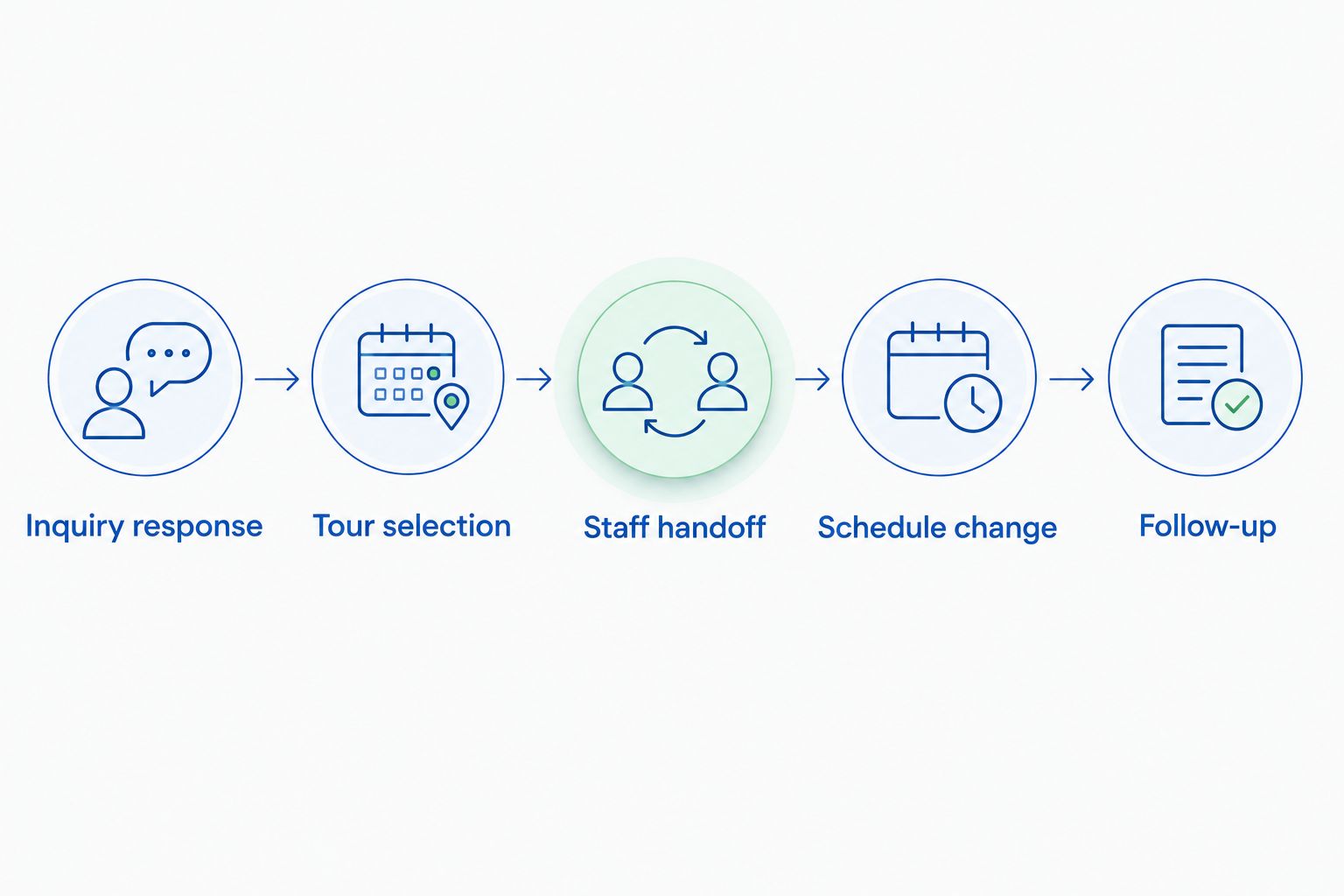
Then follow the same sequence for every shortlisted tool:
- Inquiry response: Submit a question about hosting an event. Check who answers it and whether the answer addresses the request.
- Tour selection: Move from the conversation to a specific appointment. Check who selects the time and who receives it.
- Staff handoff: Give the host the information needed to prepare. Confirm where unanswered questions go.
- Schedule change: Request a different appointment. Check that staff and prospect receive consistent information.
- Follow-up: Leave the process unfinished. Identify who owns the next action rather than assuming the tool does.
The final step deserves particular attention. A prospect who stops before booking is not the same as a confirmed visitor who needs an appointment update. Treat those as different workflows.
Which event venue tour tool should you choose?
Choose the sales-agent approach when prospects need answers and follow-up before they book. Choose Calendly when qualified prospects need a scheduling link, or Acuity Scheduling when structured intake is the deciding requirement.
Microsoft Bookings belongs on the shortlist for staff-managed appointments. Google Calendar appointment schedules suit a narrower calendar-first process. Neither choice removes the need to assign responsibility for incoming inquiries.
For 2026, the default decision is straightforward: fix the earliest broken step. Improving appointment administration does not answer an inquiry that never receives a useful reply.
FAQ
What's the best event venue tour tool in 2026?
VenueX is the strongest fit here for inquiry-to-tour sales because it combines inquiry replies, automatic follow-up, and tour booking across email, text, and web chat. Calendly is a narrower choice when prospects already want a tour and only need a scheduling link.
Is Calendly enough for a wedding venue?
Calendly fits a wedding venue that needs self-service appointment scheduling after the sales conversation. Your team still needs to answer venue questions and follow up with prospects who do not book.
Which tour scheduling tool is best for intake forms?
Acuity Scheduling is the intake-focused choice in this comparison because it combines appointment scheduling with intake forms. Ask only for information that helps your team prepare or determine the next step.
Can Microsoft Bookings help coordinate venue tour staff?
Microsoft Bookings supports appointment booking and staff scheduling. Evaluate staff assignment, calendar configuration, and handoffs using your actual tour workflow before choosing it.
Can I use Google Calendar for venue tour bookings?
Google Calendar appointment schedules provide a booking-page approach connected to your calendar. Check your account's eligibility and features, and keep event-date reservations separate from tour appointments.
Does a confirmed venue tour reserve the event date?
A tour confirmation should not be treated as an event-date reservation unless your venue explicitly makes that commitment. State the distinction in your booking communication so prospects understand what the appointment confirms.
How should I compare venue tour scheduling software?
Compare the complete path from inquiry to appointment, not just the booking page. Test question handling, time selection, staff handoff, schedule changes, and responsibility for unfinished conversations.
One last thing
A calendar can show that someone has time to give a tour. It does not establish that the property fits the prospect's event.
Before your next demonstration, write down the question your team must answer before inviting someone to visit. Make that question part of the test. The right 2026 tool should help your team reach a useful next step—not merely put an appointment on the calendar.