

Best overall for automated inquiry response: VenueX. Best for event-sales coordination: Tripleseat. Best for venue operations: Planning Pod. This 2026 guide compares venue inquiry management software by the work you need handled: answering leads, organizing sales, or managing the event after the booking.
- VenueX is the best fit for venues seeking automated inquiry replies, follow-up, and tour booking across email, text, and web chat.
- Tripleseat suits event-sales coordination; Planning Pod suits broader venue operations.
- HoneyBook fits service-business client administration; HubSpot fits configurable CRM pipelines.
- Choose venue inquiry management software around the next action each lead needs, not the longest feature list.
Why this matters
An inquiry record is not a reply. A reply is not a tour booking. Your software needs to cover the specific gap between those steps.
For a wedding venue, an unanswered question about packages needs a useful response. For a hotel events team, an active opportunity needs an owner and a next action. For a caterer, an accepted proposal needs an orderly handoff into delivery.
Buy for the bottleneck, not the category label. A CRM, a sales agent, and an event-management platform belong in the same buying conversation, but they do not do the same job.
What makes the best venue inquiry management software?
Use these criteria for your 2026 shortlist. Ask each vendor to demonstrate the workflow rather than confirm a feature checkbox.
- Useful first replies: Can the system answer the actual question using your approved venue information, rather than simply acknowledge receipt?
- Follow-up ownership: Does someone—or an automated workflow—own the next action when a prospect stops responding?
- Channel coverage: Can your team handle the email, text, and website conversations your inquiry process requires?
- Tour progression: Does the conversation move toward an appropriate appointment, with a clear route for exceptions?
- Sales visibility: Can your team distinguish a new inquiry from an active conversation, a scheduled tour, and a stalled opportunity?
- Operational fit: Does the software solve the inquiry problem without forcing you to replace processes that already work?
A strong demonstration follows a lead from arrival to handoff. A collection of disconnected screens does not prove that the process works.
Venue inquiry management software at a glance
The order below follows distinct buying needs. The first choice addresses inquiry conversations directly; the remaining options fit different sales and operational priorities.
| Software | Best for | Standout focus | Key limitation |
|---|---|---|---|
| VenueX | Automated inquiry response and tour booking | Replies and follow-up across email, text, and web chat | Its stated scope does not establish full event-operations coverage |
| Tripleseat | Event-sales coordination | Hospitality-focused sales and event management | A broader event-sales system is a different purchase from a dedicated conversational sales agent |
| Planning Pod | Venue operations alongside sales | Event and venue management workflows | Operational breadth adds processes beyond inquiry handling |
| HoneyBook | Service-business client administration | Proposals, contracts, invoicing, and client workflows | Its general service-business focus is not a venue-specific tour workflow |
| HubSpot | Configurable CRM pipelines | Contact records, deal stages, and sales workflows | Venue-specific stages and ownership rules need configuration |
1. VenueX: best for automated inquiry response
VenueX handles incoming inquiries, automatic follow-up, and tour booking through email, text, and web chat. It serves wedding venues, event venues, caterers, and hotels. The fit is direct when your team needs conversations handled, not just recorded.
The distinction is action versus storage. A lead record tells a salesperson that someone asked about an event. A sales agent's job is to answer, continue the exchange, and move the prospect toward a tour.
VenueX pros:
- Explicitly focuses on inquiry response, follow-up, and appointment booking.
- Covers email, text, and web chat within its stated offering.
- Serves hospitality businesses rather than an unrelated sales category.
VenueX cons:
- Its stated offering does not establish coverage for contracts, invoicing, or event production.
- It needs approved venue information and clear escalation rules to represent your business appropriately.
- It does not remove the need for staff judgment on exceptions or sensitive conversations.
Best for: A venue whose inquiry process needs automatic replies and continued follow-up before the tour.
The Estate at Florentine Gardens case study reports 25% more booked revenue, 40% more tours, and over 60 hours saved per month after adding the sales agent. Those are results from that venue, not a forecast for yours. Use your own inquiry and tour records to evaluate the outcome.
Verdict: Buy for inquiry conversations and tour progression; assess event operations separately.
2. Tripleseat: best for event-sales coordination
Tripleseat is an event-sales and management platform built for hospitality businesses. Its role extends beyond answering an initial inquiry into organizing sales activity and event details.
That makes Tripleseat a relevant shortlist option when the sales team needs a shared operating system. The central question is whether your problem is coordinating active business or conducting the conversation that turns a new inquiry into active business.
Tripleseat pros:
- Focuses on hospitality sales and events.
- Connects sales work with the event-management context.
- Fits an evaluation centered on shared sales coordination.
Tripleseat cons:
- Broader sales and event coverage brings decisions beyond inquiry handling.
- Selecting an event-sales platform does not, by itself, establish how conversational responses will work.
Best for: A hospitality sales team organizing opportunities and event details across its process.
Ask Tripleseat to demonstrate an inquiry arriving, a salesperson taking ownership, and the opportunity moving toward a booking. Then ask who writes the next response when the prospect asks an unexpected question. Those are separate requirements.
Verdict: Buy for event-sales coordination; assess conversational automation as a separate requirement.
3. Planning Pod: best for venue operations alongside inquiries
Planning Pod provides venue and event-management software. Its broader operational focus makes it relevant when inquiry handling sits inside a larger problem involving event information, planning, and team coordination.
Choose this evaluation path when the handoff after the sale needs as much attention as the initial lead. Do not select an operations platform simply because the inquiry inbox is busy.
Planning Pod pros:
- Addresses venue and event-management work.
- Supports an evaluation spanning sales and event delivery.
- Gives operations a clear place in the buying decision.
Planning Pod cons:
- A broad operational rollout requires decisions outside the sales inbox.
- Event-management coverage does not establish the depth of automated inquiry conversations.
Best for: A venue seeking a broader management system, rather than a response-only solution.
During a Planning Pod demonstration, follow the information from an inquiry into a booked event. Check whether the people delivering the event receive the details they need without reinterpreting the sales conversation. Separately test how the initial response gets written and sent.
Verdict: Buy when event operations belong in the same project; skip a broad rollout for an isolated response problem.
4. HoneyBook: best for service-business client administration
HoneyBook is a client-management platform for independent and service-based businesses. Its established functions include proposals, contracts, invoicing, and client workflows.
That makes HoneyBook relevant to a caterer or owner-operated event business whose administrative process needs attention. Its service-business orientation is different from a platform built around venue tours or hospitality event sales.
HoneyBook pros:
- Brings proposals, contracts, and invoicing into the client process.
- Addresses administrative work after a prospect expresses interest.
- Fits a buying decision centered on managing client engagements.
HoneyBook cons:
- A general client workflow needs adaptation to your venue's sales stages.
- Document and payment administration are not substitutes for answering venue-specific questions.
Best for: A service-led event business prioritizing client administration over venue-specific sales coordination.
Show HoneyBook your actual path from inquiry to signed agreement. Include the moments when the client changes scope or asks for information before proceeding. Judge the complete workflow, not just the appearance of a proposal.
Verdict: Buy for client administration; skip if automated venue conversations are the primary requirement.
5. HubSpot: best for configurable CRM pipelines
HubSpot provides CRM tools for managing contacts, deals, and sales activity. Its fit here is a configurable sales process rather than a venue-specific operating model.
You define what an inquiry means, which stages matter, and who owns each next action. That flexibility suits a team prepared to maintain its CRM rules. It is less attractive when nobody owns the setup.
HubSpot pros:
- Organizes contacts and sales opportunities around a shared CRM.
- Supports a buying decision focused on pipeline structure and sales visibility.
- Allows your team to define stages around its own process.
HubSpot cons:
- Venue-specific qualification and tour stages require configuration.
- A contact record does not establish who answers the prospect's next question.
- Process ownership remains your team's responsibility.
Best for: A venue group or sales team that wants a configurable CRM and has a named process owner.
Ask HubSpot to demonstrate your actual lead stages, including reassignment and stalled opportunities. Keep the evaluation concrete: who receives the inquiry, who responds, and what happens when that person is unavailable?
Verdict: Buy for CRM control with a named owner; wait if the sales process itself remains undefined.
Test the inquiry journey before you choose
For your 2026 evaluation, give every shortlisted vendor the same scenario: a prospective client asks about an event, requests more detail, goes quiet, then returns ready to arrange a visit.
Use the following sequence to separate a useful workflow from a polished demonstration:
- Inquiry arrival: Identify where the message lands and how the record is created.
- Useful reply: Check that the response addresses the question using approved information.
- Follow-up: Establish who continues the conversation and when outreach stops.
- Tour booking: Follow the appointment process through confirmation.
- Human handoff: Test an exception that requires staff judgment.
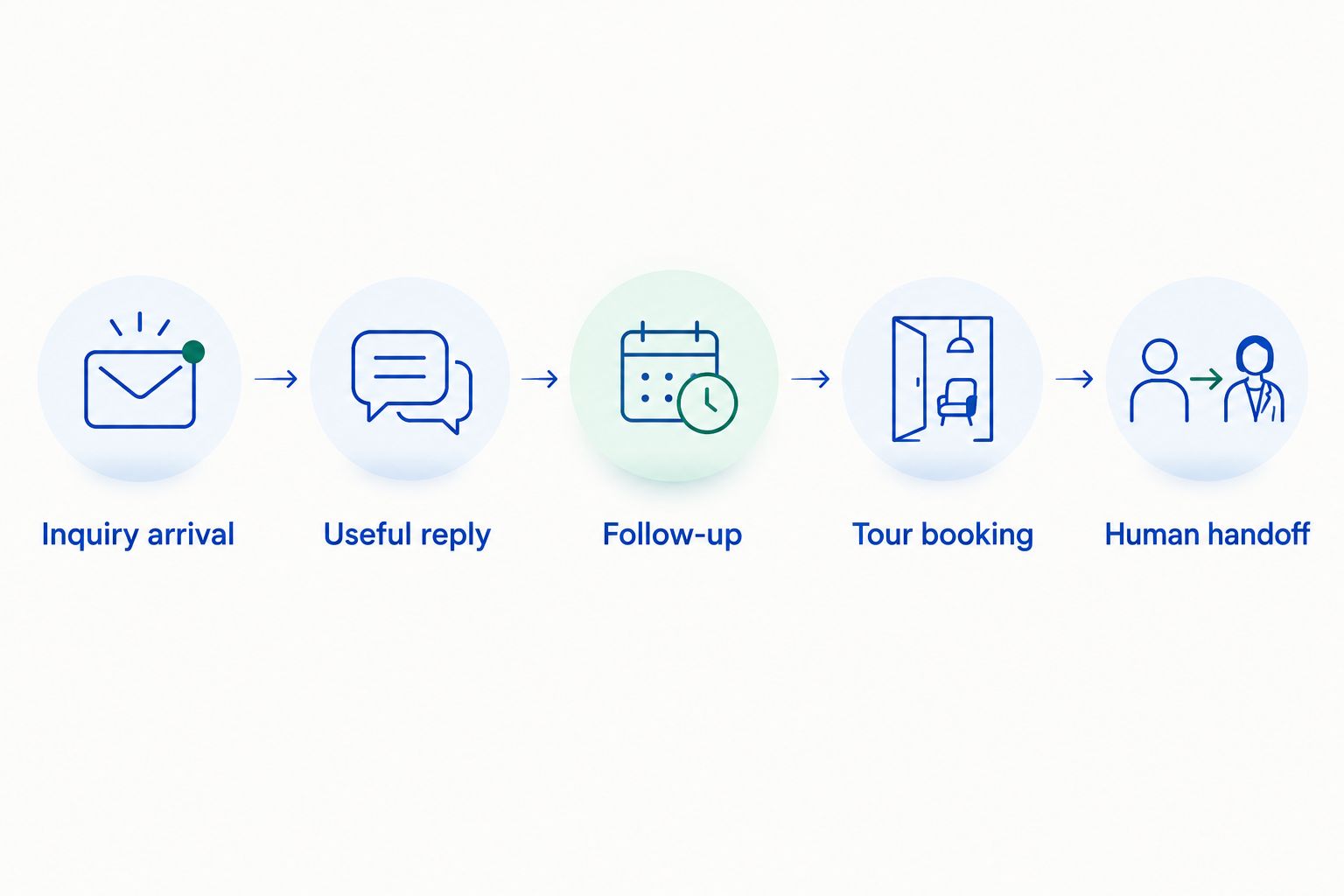
Watch what happens when the prospect asks something outside the approved information. A responsible process routes the question to the right person instead of inventing an answer.
Also check whether a booking or opt-out stops the relevant follow-up. Your acceptance criteria should describe the behavior you expect, not just the features you want enabled.
How the ranking works
This 2026 ranking prioritizes the article's central job: managing a venue inquiry through a useful response and a clear next step. Hospitality fit, channel coverage, follow-up, sales visibility, and operational scope determine the distinct recommendation slots.
The list is a workflow-fit comparison, not a claim of identical hands-on testing. Broader functionality does not automatically earn a higher position. It earns a different use case.
Which venue inquiry management software should you choose?
Choose the dedicated sales-agent approach when unanswered inquiries and unfinished follow-up are the problem. Choose Tripleseat for event-sales coordination, Planning Pod for broader venue operations, HoneyBook for client administration, or HubSpot for a configurable CRM.
For a 2026 purchase, write the required outcome before requesting demonstrations. “Every inquiry has a useful response and an owned next action” is a clearer brief than “we need better software.”
Keep existing systems when they already perform their role. Ask vendors to demonstrate any required connection; do not assume that shared category labels mean compatible workflows.
See inquiry handling in action
Explore automated replies, follow-up, and tour booking across email, text, and web chat.
FAQ
What's the best venue inquiry management software for automated replies?
VenueX is the best fit in this comparison for automated inquiry replies, follow-up, and tour booking. Its stated offering covers email, text, and web chat for wedding venues, event venues, caterers, and hotels.
Is Tripleseat the same thing as a venue sales agent?
No. Tripleseat is an event-sales and management platform, while a conversational sales agent focuses on responding to inquiries and continuing the exchange. Evaluate those jobs separately.
Should I choose Planning Pod for inquiry management?
Choose Planning Pod when venue and event operations belong in the same buying project. If your only problem is unanswered inquiries, evaluate response handling before committing to a broader operational change.
Is HoneyBook suitable for a catering business?
HoneyBook is relevant when a catering business needs client administration such as proposals, contracts, and invoicing. Test the inquiry-to-agreement workflow against your actual service process.
Can HubSpot manage venue inquiries?
HubSpot can organize venue inquiries through CRM contacts, deals, and sales activity. Your team still needs to define venue-specific stages, ownership, and the process for answering prospects.
Do I need to replace my existing event-management software?
No. An inquiry-response problem does not automatically require replacing an event-management system. Assess the missing workflow and require a demonstration of any connection your process needs.
What should I test in a software demonstration?
Test an inquiry from arrival through response, follow-up, tour booking, and human handoff. Include an unexpected question and verify what stops further outreach.
One last thing
Test a lead that should not receive another message. A booked tour, an explicit opt-out, and a staff takeover each need a defined outcome in your process.
Starting automation is only part of the job. Knowing when to stop is part of managing the inquiry.