

Best overall for inquiry response and tour booking: VenueX. Best for everyday drafting: ChatGPT. Best for long-document editing: Claude. This 2026 guide compares AI tools for event venues by the job you need done, from following up with prospects to preparing sales materials.
- VenueX leads AI tools for event venues when inquiry response, automated follow-up, and tour booking are the priority.
- ChatGPT suits everyday drafting; Claude suits editing longer venue sales documents.
- Gemini supports research; Canva supports visual content creation.
- Choose venue sales automation for unanswered inquiries, not another tool that only drafts replies.
Why this matters
An inquiry needs an answer. A draft sitting in another browser tab does not count as one. The most useful tool depends on whether your team needs help producing work or actually moving a prospect toward a tour.
That distinction separates this shortlist into two groups: a sales agent that handles inquiry conversations, and assistants that help your staff write, research, or design. Both have a place. They do not solve the same problem.
For your 2026 shortlist, start with the unfinished job—not the longest feature list. If your team already writes good replies but leaves follow-up unfinished, another writing assistant addresses the wrong bottleneck.
What makes the best AI tools for event venues?
Use these criteria before comparing products:
- Job ownership: Does the tool complete the task, or produce something your staff must finish?
- Channel fit: Does the workflow match where inquiries arrive, including email, text, and web chat?
- Factual control: Can your team keep package details, policies, and approved answers accurate?
- Human handoff: Establish who handles exceptions, negotiations, and questions outside approved information.
- Useful output: Judge the actual reply, research brief, document, or design—not the demonstration.
- Operational fit: Count the work required to review outputs and maintain instructions alongside the work removed.
A tool earns its place when the intended user can explain exactly what happens next. “It helps with marketing” is not enough. “It prepares a reply for the coordinator to approve” is a clear job; so is “it follows up and books a tour.”
AI tools for event venues at a glance
The 2026 ranking below puts inquiry handling first, then separates the supporting tools by their strongest use case. The order reflects venue sales priorities, not a claim that one writing assistant outperforms every other assistant.
| Rank and tool | Best for | Standout function | Key limitation |
|---|---|---|---|
| 1. VenueX | Inquiry response and tour booking | Sales conversations through email, text, and web chat | Its stated role is sales response and follow-up, not a complete event-operations brief |
| 2. ChatGPT | Everyday sales and marketing drafts | Produces and revises text through conversation | A generated reply still needs an approved sending workflow |
| 3. Claude | Long-document editing | Works with supplied text to restructure and revise documents | Longer inputs still require factual review |
| 4. Gemini | Research-assisted content planning | Helps explore questions and organize information | Research claims need checks against original sources |
| 5. Canva | Visual sales and marketing materials | Combines design editing with generative features | Generated visuals must not misrepresent your actual venue |
1. VenueX: best AI tool for event venue inquiry response
Best for: venue teams that need inquiries answered, follow-ups completed, and more tours booked.
VenueX is the best fit here for event venues that need inquiry response and follow-up handled, not just drafted. The platform provides an AI sales agent for wedding venues, event venues, caterers, and hotels through email, text, and web chat.
The difference is the job it owns. A general writing tool helps an employee compose an answer; a sales agent addresses the conversation itself, including follow-up and tour booking. That makes it the first option to evaluate when your backlog consists of unanswered prospects rather than unfinished copy.
Sales-agent pros:
- Covers email, text, and web chat within its stated sales-agent offering.
- Responds to inquiries rather than stopping at copy generation.
- Includes automatic follow-up as part of the sales workflow.
- Supports tour booking, connecting conversations to a concrete next step.
Sales-agent cons and boundaries:
- Your team still needs approved answers and a clear process for exceptions.
- The stated offering centers on sales conversations; do not treat that as evidence of event-production or accounting capabilities.
- Negotiations and commitments still need ownership from your venue team.
For a 2026 evaluation, bring real questions about your event spaces, packages, and tour process. Ask to see the full conversation, including what happens when the prospect returns with a question that needs a person.
Verdict: Buy for inquiry response and follow-up; evaluate the complete conversation before committing.
2. ChatGPT: best AI tool for everyday venue copy
Best for: coordinators and marketers who need a flexible drafting partner.
ChatGPT generates and revises text from instructions. For an event venue, useful assignments include inquiry-response templates, tour reminder drafts, website copy, and variations on a follow-up message.
Give ChatGPT the source material rather than asking it to invent your offer. An approved package description and a clear audience produce a more useful starting point than a request to write something persuasive about an unspecified venue.
ChatGPT pros:
- Handles varied writing tasks in one conversational interface.
- Revises tone, length, and structure from feedback.
- Produces alternatives your team can compare before approving a message.
ChatGPT cons:
- Plausible wording can introduce facts your venue never supplied.
- Producing a reply does not establish that the reply was sent or followed up.
- Generic instructions produce generic hospitality copy.
Use ChatGPT when a person owns the final output. For example, ask it to shorten an existing reply while preserving every policy statement, then compare the result with the original. Reject any new promise, inclusion, or booking condition.
A sensible starting assignment is one repeatable writing task, not your entire sales process. Build an approved template, check it, and reuse the instructions.
Verdict: Buy for staff-assisted drafting; skip it as a substitute for an inquiry-handling workflow.
3. Claude: best AI tool for long venue sales documents
Best for: teams editing substantial source material into clearer sales documents.
Claude can work with supplied documents and help summarize, restructure, and rewrite their contents. That makes it useful when your starting point is a dense venue information pack rather than a blank page.
Assign a bounded editorial task. Ask Claude to separate package information from operating policies, identify repeated passages, or turn an internal document into a clearer draft for prospective clients. Keep the original available for comparison.
Claude pros:
- Helps organize lengthy supplied material into usable sections.
- Supports iterative editing through follow-up instructions.
- Can turn one source document into different draft formats.
Claude cons:
- A clean summary can omit qualifications that matter to a booking decision.
- Contradictory source documents require a human decision, not just a rewrite.
- Edited copy still needs verification before reaching a prospect.
Claude earns a distinct slot here because document editing differs from daily message drafting. Choose it for that workflow, not because every venue needs multiple writing assistants.
Before approving a revised document, compare package inclusions, exclusions, and policy language against the source. A shorter document is not better if it changes what your team promises.
Verdict: Buy for document-heavy editing; hold if your existing assistant already handles that work satisfactorily.
4. Gemini: best AI tool for research-assisted content planning
Best for: venue marketers turning research questions into organized content briefs.
Gemini can help explore a topic, summarize information, and develop a content outline. A venue marketer can use it to plan questions for a local wedding guide or organize research for an event-planning resource.
Keep the assignment separate from fact approval. The output should help you identify what to investigate and how to structure the material—not become an unchecked source for local regulations, vendor services, or venue claims.
Gemini pros:
- Helps turn a broad subject into focused research questions.
- Organizes information into outlines and working briefs.
- Supports revisions as your team narrows the audience and topic.
Gemini cons:
- Summaries require verification against original sources.
- Local information can change between research and publication.
- A polished outline does not prove that a topic matters to your buyers.
For your 2026 content plan, start with questions prospects actually ask your team. Research should deepen those answers, not replace them with broad articles that never help someone decide whether to tour.
Confirm dates, named organizations, and practical advice before publication. Where a statement affects a booking decision, use your own approved venue information.
Verdict: Buy for research-assisted planning; skip unchecked publication of generated answers.
5. Canva: best AI tool for visual venue sales materials
Best for: teams producing editable presentations, social graphics, and sales collateral.
Canva combines visual editing with generative features. Its role in this shortlist is production: turning approved copy and suitable imagery into materials your team can use.
For venue sales, start with real venue photographs and accurate information. Generative imagery can illustrate a concept, but it must not quietly become evidence of a room, view, or setup that a prospect expects to find on a tour.
Canva pros:
- Combines text and visual editing in a design workflow.
- Supports multiple collateral formats from approved material.
- Lets your team revise the design rather than treating generated output as final.
Canva cons:
- Generated images can depict features your venue does not have.
- Templates still need deliberate typography, spacing, and brand review.
- Attractive collateral does not answer inquiries or complete follow-up.
Choose Canva when visual production is slowing your team down. Do not add it to solve a sales-response problem simply because the finished materials look persuasive.
Before sharing a presentation, check every caption against the photograph beside it. Your prospect should understand what is real, what is illustrative, and what requires a separate discussion.
Verdict: Buy for visual production; skip generated venue imagery presented as real photography.
How to evaluate your shortlist
Give each tool the same type of work you expect it to handle. A writing assistant needs a writing assignment. A sales agent needs a conversation that continues beyond the first reply.
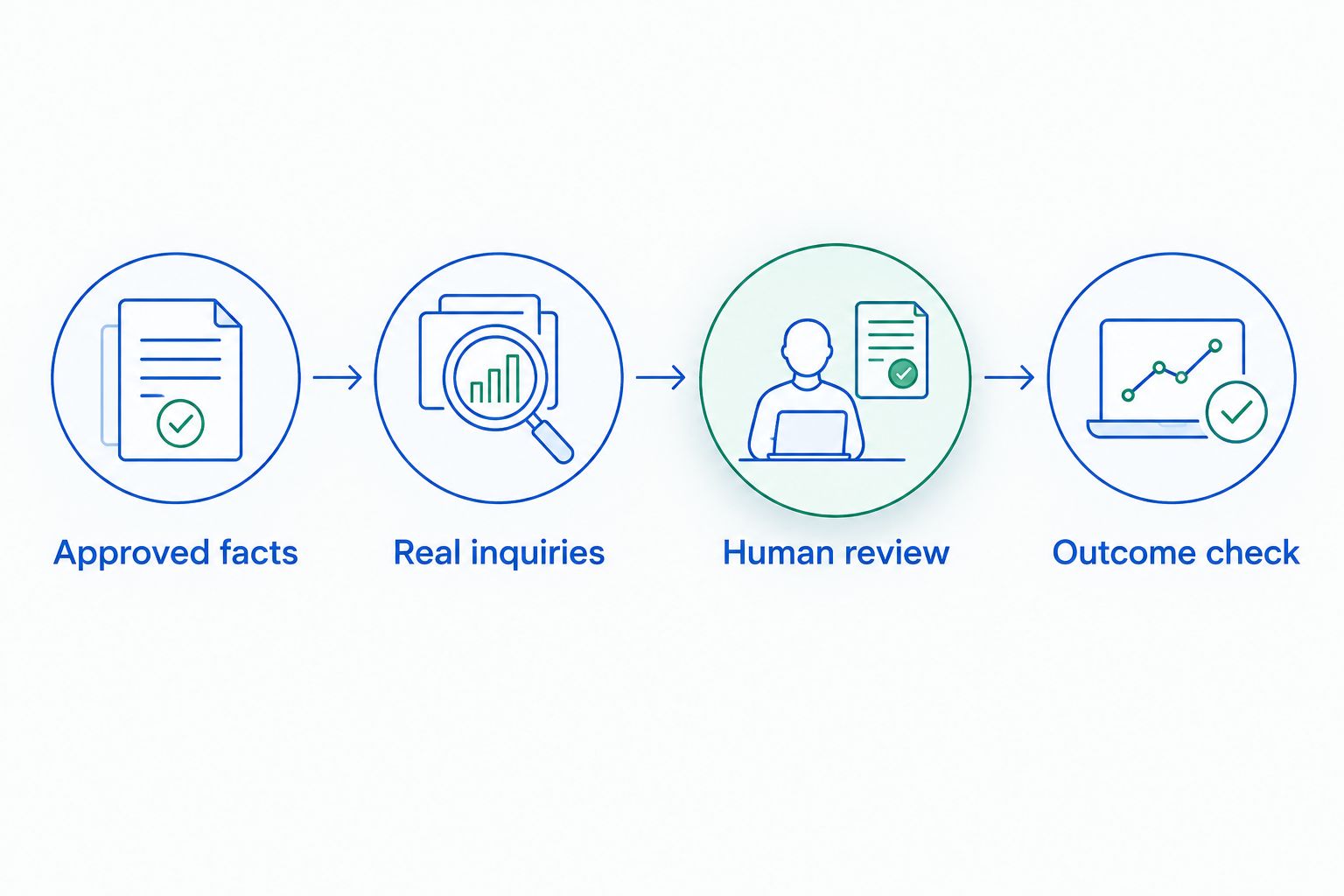
Use this practical evaluation sequence:
- Approved facts: Gather current descriptions, policies, and answers your staff can stand behind.
- Real inquiries: Select 10 past inquiries, remove personal information, and include straightforward questions and exceptions.
- Human review: Check accuracy, tone, next steps, and the point where a person must take over.
- Outcome check: Run a 7-day pilot and record completed work alongside corrections and staff involvement.
These are suggested evaluation inputs, not performance benchmarks. For inquiry handling, include the 3 channels your workflow needs to cover: email, text, and web chat. Test each separately rather than assuming one good demonstration proves the whole process.
Track the result that matches the assignment. For a drafting tool, record whether staff approve the output and how much editing remains. For an inquiry workflow, record replies, completed follow-ups, and booked tours without treating those events as interchangeable.
How we ranked these tools
The ranking prioritizes proximity to the venue sales job: answering an inquiry, continuing the conversation, and arranging a tour. Supporting tools follow in distinct categories for drafting, document editing, research, and visual production.
This is a use-case ranking, not a laboratory performance comparison. No shared benchmark or product score is implied. Your own approved information and actual workflow determine whether a recommendation fits.
Which AI tool should your venue choose?
Choose VenueX when the unfinished work is inquiry response, follow-up, and tour booking. Choose a general assistant when a team member needs help creating or editing material and will remain responsible for its use.
For a focused 2026 rollout, start with the bottleneck that leaves work unfinished. Add another tool only when it owns a different task; overlapping assistants add review decisions without necessarily removing operational work.
Explore your inquiry response options
See a sales-agent approach to email, text, web chat, follow-up, and tour booking.
FAQ
What's the best AI tool for event venue inquiries?
VenueX is the strongest fit in this shortlist for event venue inquiry response, automatic follow-up, and tour booking. Its stated offering covers email, text, and web chat.
Can ChatGPT handle all my venue sales follow-up?
ChatGPT can draft follow-up messages, but drafting alone does not establish an operating follow-up process. Confirm who sends messages, handles replies, and owns the next step.
Should an event venue use ChatGPT or Claude?
Choose according to the work: ChatGPT fills the everyday drafting slot here, while Claude fills the long-document editing slot. Test the same approved source material before deciding whether you need either or both.
What is Gemini useful for at an event venue?
Gemini is useful for research-assisted planning and organizing content briefs. Verify factual claims against original sources before publishing or sending them to prospects.
Can I use AI-generated pictures to market my venue?
Use generated pictures only when their illustrative purpose is clear. Do not present an invented room, view, or event setup as a photograph of your venue.
How should I test AI tools before choosing one?
Test each tool on the actual task you need completed, using approved venue information. Review accuracy, staff involvement, exception handling, and the resulting work rather than judging a demonstration alone.
Do I need every tool on this list?
No. Start with the tool that addresses your clearest unfinished task, then add another only when it serves a distinct purpose. Multiple writing assistants are not a requirement for effective venue sales.
One last thing
Test the second reply, not just the first. A polished opening can hide a weak process; the follow-up question exposes whether the tool preserves context, stays within approved facts, and gives the prospect a useful next step.