
Best overall: VenueX for inquiry response, follow-up, and tour booking. Best for answering venue questions: a knowledge-base AI widget; best for collecting inquiry details: a qualification-first AI widget; best for staff-controlled conversations: a human-handoff AI widget. This 2026 guide ranks those approaches by the job your venue needs done.
- VenueX is the best ai widget for venues that need inquiry response, automatic follow-up, and tour booking together.
- Choose a knowledge-base AI widget when answering venue questions matters more than managing the sales conversation.
- Choose qualification-first chat for structured inquiries; choose human-handoff chat when staff must approve the next step.
- Evaluate web chat alongside email and text. A website conversation is only part of venue sales.
Why this matters
A chat window can answer a question without moving an inquiry toward a tour. Those are different outcomes. Before you choose an AI widget for venues in 2026, decide whether you need information delivery, lead collection, staff routing, or an ongoing sales conversation.
A couple asking about ceremony options needs a useful answer. A planner asking about a complex event needs the right person. Neither benefits from a widget that treats every message as a request to submit a form.
Choose the sales workflow first. Choose the chat interface second. The rankings below distinguish one named platform from three widget configurations you can use as buying requirements. They are not four products presented as a hands-on software test.
What makes the best AI widget for venues
Judge each option against these six criteria before you look at a demo:
- Answer accuracy: The widget uses approved venue information and avoids inventing package details, policies, or date availability.
- Inquiry context: The conversation captures the event type, preferred date, guest count, and question without becoming an interrogation.
- Next-step relevance: The response points toward a tour, an appropriate staff conversation, or a clear answer—not the same action for everyone.
- Follow-up continuity: Your team knows what happens after the visitor leaves the website or stops replying.
- Staff control: Unusual requests reach a person, with enough context to avoid making the prospect start again.
- Channel coverage: You understand whether the purchase covers web chat alone or also supports email and text conversations.
Ask vendors to demonstrate these behaviors with your own venue questions. A prepared greeting proves very little; a difficult follow-up question reveals much more.
Best AI venue widgets at a glance
The table compares buying approaches, not equivalent feature bundles. For the configurable options, the standout feature is the capability you should require from a supplier.
| Rank and option | Best for | Standout capability | Key limitation |
|---|---|---|---|
| 1. VenueX | Inquiry-to-tour sales conversations | Inquiry replies, automatic follow-up, and tour booking across email, text, and web chat | Confirm venue-specific rules and workflow fit before selecting |
| 2. Knowledge-base AI widget | Repeated venue questions | Answers grounded in approved venue content | Answering questions does not establish follow-up or booking capability |
| 3. Qualification-first AI widget | Structured inquiry collection | Captures event requirements before staff review | Collection alone does not resolve the prospect's questions |
| 4. Human-handoff AI widget | Staff-controlled exceptions | Routes conversations to the right person | Progress depends on staff coverage once a handoff occurs |
Do not treat every chat product as a sales agent. If the demonstration ends at collecting an email address, you still need to establish who answers, follows up, and books the tour.
1. VenueX: best AI widget for inquiry-to-tour sales
VenueX provides an AI-powered sales agent for wedding venues, event venues, caterers, and hotels. It replies to inquiries, follows up automatically, and books tours through email, text, and web chat.
That scope makes it the strongest fit here when your problem extends beyond website questions. The relevant buying decision is whether you want chat to participate in the sales process, rather than operate as a separate information desk.
VenueX pros
- Covers inquiry response, automatic follow-up, and tour booking within the stated platform scope.
- Supports email, text, and web chat rather than limiting the use case to website visitors.
- Serves the hospitality businesses named in this guide: venues, caterers, and hotels.
- Addresses the next sales action, not just the first answer.
Trade-offs to evaluate
- A broader sales-agent scope requires decisions about approved answers, follow-up boundaries, and when staff should take over.
- The stated capabilities do not establish compatibility with your particular calendar, CRM, or booking rules. Confirm each requirement directly.
- If your only requirement is a small set of website answers, evaluate whether you need the broader workflow.
Best for: Venue sales teams that need inquiry response, follow-up, and tour booking together.
For your 2026 evaluation, bring an actual inquiry thread to the demonstration. Ask how the conversation progresses when the prospect answers by text after beginning on the website. Confirm the supported behavior instead of assuming that channel coverage guarantees every handoff you need.
Verdict: Buy for the full inquiry-to-tour use case after confirming your operational requirements.
2. Knowledge-base AI widget: best for repeated venue questions
A knowledge-base AI widget answers questions using the content you approve for it. Choose this configuration when visitors need explanations of spaces, event formats, venue policies, or the tour process before they are ready to contact sales.
The defining requirement is content-grounded answering. Do not assume a widget also handles follow-up, booking, or live availability because it can explain a page on your website.
Knowledge-base AI widget pros
- Gives visitors a conversational way to find approved venue information.
- Supports a focused scope that your team can review question by question.
- Makes repeated informational questions the primary job rather than forcing immediate lead capture.
Knowledge-base AI widget cons
- Incomplete or contradictory source material leaves the answering scope incomplete.
- Knowledge of published content is not evidence of access to current calendars or event records.
- An answer-only configuration leaves follow-up and tour conversion to another process.
Best for: Venues whose immediate requirement is answering repeated questions accurately.
During evaluation, ask a question your content answers, then one it does not. Require a clear boundary on the second response. An honest handoff is more useful than a confident answer about a policy your team never approved.
Verdict: Buy for information coverage; skip as a substitute for a sales workflow.
3. Qualification-first AI widget: best for structured inquiries
A qualification-first AI widget is configured to collect event requirements through conversation. Your buying brief should specify the details staff need to assess an inquiry, such as event type, preferred date, guest count, and the prospect's main question.
This approach suits a team whose first task is understanding the request. It is not automatically a booking system or a source of confirmed date availability.
Qualification-first AI widget pros
- Establishes a consistent set of inquiry details for staff review.
- Lets you define different questions for weddings, corporate events, and other event types.
- Gives the receiving salesperson a clearer brief when the configuration preserves the conversation.
Qualification-first AI widget cons
- Asking for details without answering questions makes the experience resemble a form.
- Excessive qualification creates work for someone who only needs a simple answer.
- Capturing an inquiry does not establish ownership of the next response.
Best for: Venues that need structured event requirements before a salesperson takes over.
For a 2026 shortlist, require a demonstration in which the visitor changes the date or guest count halfway through the chat. Check whether the final inquiry reflects the correction. Also check that the original question remains visible, rather than disappearing behind the collected fields.
Verdict: Buy for inquiry structure; hold if nobody owns the response afterward.
4. Human-handoff AI widget: best for staff-controlled exceptions
A human-handoff AI widget is configured to route conversations to staff when a request falls outside its approved scope. It is the right buying approach when your team needs direct control over custom arrangements or exceptions.
The handoff should be a defined process, not a vague promise that someone will respond. Require a destination, a conversation summary, and a clear message explaining what happens next.
Human-handoff AI widget pros
- Keeps approval of unusual requests with the people responsible for delivering the event.
- Creates a clear boundary between approved information and staff decisions.
- Supports escalation when a visitor asks for a person rather than more automated questions.
Human-handoff AI widget cons
- The conversation waits on staff once the automated scope ends.
- A transfer without context makes the prospect repeat information.
- Routing a conversation does not itself provide follow-up or appointment booking.
Best for: Venues that want staff to control exceptions and custom event discussions.
Test an inquiry outside staffed hours. Ask exactly where it goes, what the visitor sees, and how your team identifies its next action. Do not confuse a notification with an answered inquiry.
Verdict: Buy for controlled escalation; skip as the sole answer to unattended inquiries.
How we ranked these approaches
The ranking prioritizes the stated sales task: responding to an inquiry and moving it toward a tour. Follow-up continuity and channel coverage therefore matter more than the appearance of the chat window.
The first option has explicitly stated response, follow-up, and booking capabilities. The remaining options are narrower configurations, ranked by their primary purpose. Their positions are editorial recommendations, not measured conversion rankings or claims about unnamed suppliers.
For your own 2026 selection, change the order if your goal changes. An information-only project should favor answer accuracy and content control. A staff-routing project should favor escalation quality. Neither needs to pretend it is purchasing a complete sales agent.
Put the widget through a venue-sales walkthrough
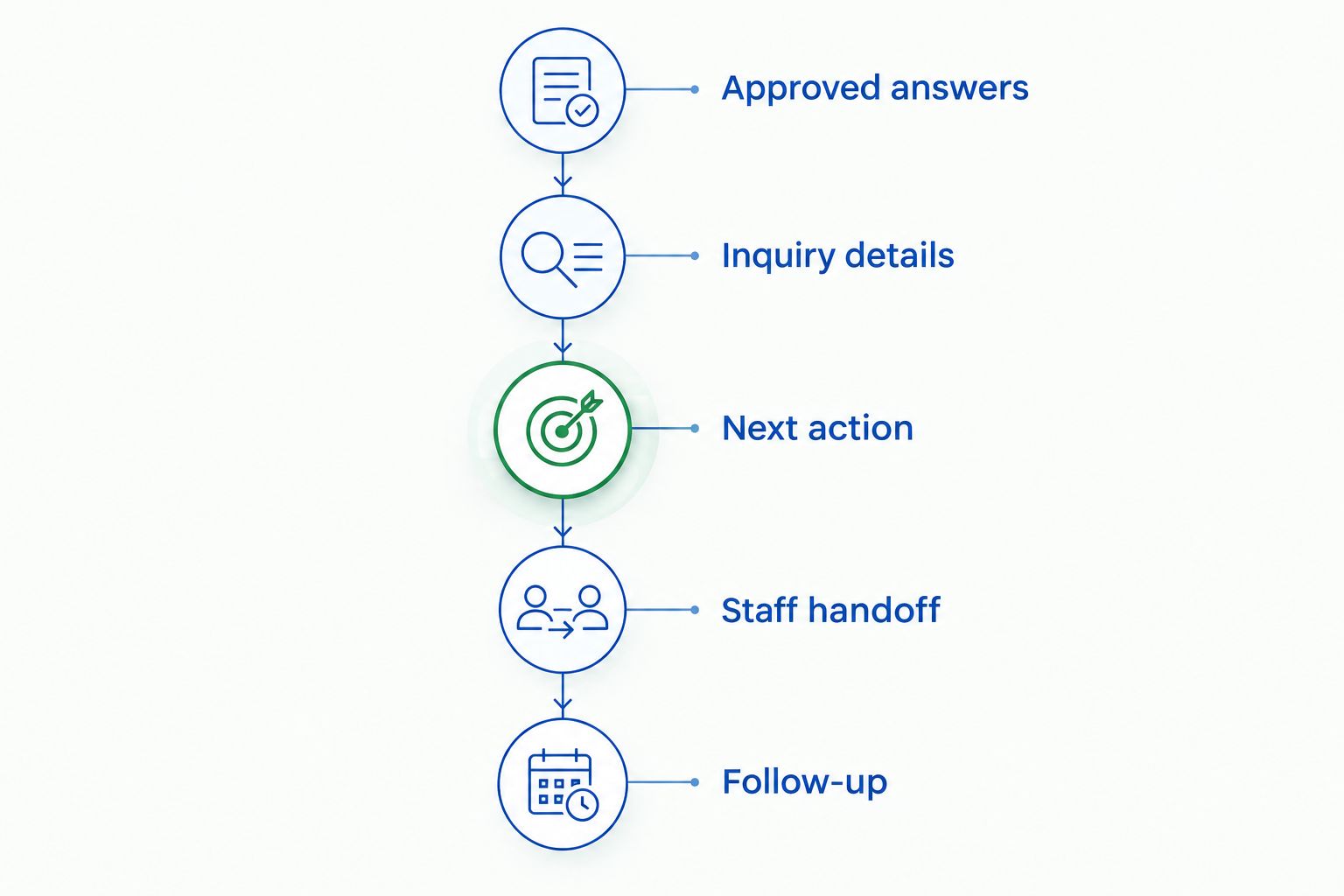
Use the same walkthrough with every supplier so attractive demonstrations do not distract from missing steps. Follow the inquiry from the first question to the action your team actually needs.
Approved answers
Give the supplier venue information your team is authorized to share. Include a question with a clear answer and a question that requires staff approval. Check both the answer and the boundary.
Inquiry details
Ask the widget to capture an event request without interrupting every answer with another question. Review what the salesperson receives. Details should preserve the visitor's intent, not merely fill fields.
Next action
Ask for a tour, then introduce a request that needs staff attention instead. Confirm how the system distinguishes those paths. Do not accept an implied booking when the workflow only submits a request.
Staff handoff
Follow an exception into the receiving team's process. Identify who owns it, what context arrives, and what the prospect has been told. A clear handoff needs all three.
Follow-up
End the conversation before completing the next step. Establish whether follow-up occurs, which channel it uses, and how it stops when staff take over. Require explicit answers rather than inferring behavior from a feature label.
Read performance claims in context
A fast reply and a booked event are not the same measurement. Track them separately when you evaluate a widget in 2026: inquiry response, useful conversations, tours booked, and booked revenue.
The published Florentine Gardens case study reports 25% more booked revenue, 40% more tours, and over 60 hours a month saved after adding the VenueX AI Sales Agent. Those are reported results from one venue, not a forecast for your business or evidence that web chat alone produced the change.
Use that distinction in your own reporting. Record which channel started the inquiry, whether staff participated, and what next step occurred. Otherwise, a platform-wide result can be mistaken for the effect of a single website feature.
Which AI widget for venues should you choose?
VenueX is best for venues that need inquiry response, automatic follow-up, and tour booking across web chat, email, and text. It is the default recommendation when the buying brief is sales continuity rather than website answers alone.
Choose a knowledge-base configuration for repeated questions. Choose qualification-first chat for structured inquiry collection. Choose human-handoff chat for staff-controlled exceptions. Require a demonstration of the relevant workflow before making the purchase.
The deciding question is simple: What must happen after the visitor gets an answer? Your answer determines the category you need.
FAQ
What's the best AI widget for venues in 2026?
VenueX is the strongest fit in this guide for venues that need inquiry response, automatic follow-up, and tour booking across email, text, and web chat. For an answer-only requirement, evaluate a knowledge-base AI widget instead.
Is an AI chat widget the same as an AI sales agent?
No. A chat widget is a website interface; an AI sales agent describes a broader sales role. Confirm whether the product answers questions only or also handles follow-up and tour booking.
Can an AI venue widget confirm whether a wedding date is available?
Only rely on date confirmation when the supplier demonstrates access to the correct availability source and approved booking rules. A widget answering from website content is not evidence of live calendar access.
What should a wedding venue chat widget ask visitors?
Ask for the details your team needs to understand the request, such as event type, preferred date, guest count, and the visitor's main question. Keep qualification relevant instead of requiring a full inquiry for every simple answer.
Should I choose FAQ chat or inquiry qualification?
Choose FAQ chat when your priority is answering repeated questions; choose inquiry qualification when staff need structured event requirements. If you need both, require the supplier to demonstrate both within the same conversation.
What should happen when the widget cannot answer a question?
The widget should state its boundary and direct the conversation to the appropriate staff member. Require the handoff to preserve context and explain the next step without inventing an answer.
How do I compare AI chat widgets without relying on a demo?
Give each supplier the same venue inquiry and follow it through answering, qualification, next action, staff handoff, and follow-up. Review the resulting staff record as well as the visitor-facing chat.
One last thing
Before approving a widget, ask it a question your venue has not authorized it to answer. The correct response is not an impressive guess. It is a clear boundary and a useful next step.
Then close the browser. Check what your team receives and who owns the inquiry. That final check tells you whether you are buying a conversation window or a working part of your sales process.