
Best for inquiry response and tour booking: VenueX. Best for event sales coordination: Tripleseat. Best for planning tasks: Planning Pod. Best for hotel group sales: Event Temple. Best for internal room reservations: Skedda. This 2026 venue workflow management guide separates those jobs so you can choose software around the work that needs fixing.
- VenueX is the venue workflow management pick for automated inquiry response, follow-up, and tour booking.
- Tripleseat fits event sales coordination; Planning Pod fits planning tasks and event details.
- Event Temple belongs on hotel group-sales shortlists; Skedda fits internal room reservations.
- Choose around your broken handoff, not the longest feature list.
Why this matters
Venue workflow management covers several different jobs: answering a new inquiry, arranging a tour, coordinating an event, and allocating a room. Software that handles one job well does not automatically handle the others.
For your 2026 shortlist, identify where work stops moving. An unanswered inquiry calls for a different purchase than an event team working from conflicting notes. Buy for the stalled step first. Then check how the next person receives the work.
What makes the best venue workflow management software?
Use these criteria before comparing product names. They keep a sales automation decision from turning into an unnecessary system replacement.
- Workflow ownership: Identify exactly where the product starts and stops, from inquiry through event delivery.
- Action versus storage: Separate tools that record information from tools that reply, follow up, or arrange the next step.
- Team handoffs: Check whether the next person receives the conversation, requirements, and outstanding actions.
- Exception handling: Test unusual requests, conflicting instructions, and questions that require a person.
- Operational fit: Match the product to your business: wedding venue sales, catering coordination, hotel groups, or internal room use.
- Demonstrable fit: Ask the vendor to complete your actual workflow rather than show an unrelated demonstration.
A useful 2026 evaluation starts with a written requirement, not a feature checklist. For example: a new inquiry needs a useful reply, an appropriate next step, and an owner if the request falls outside your rules.
Venue workflow management software at a glance
These are use-case recommendations, not claims that every product replaces every other product. Read the limitation column first if you already have a booking or event management system.
| Software | Best for | Standout focus | Key limitation to evaluate |
|---|---|---|---|
| VenueX | Inquiry response and tours | Replies, automated follow-up, and appointment booking across email, text, and web chat | Its stated scope does not establish full event operations management |
| Tripleseat | Event sales coordination | Event sales and management workflows | Test active inquiry handling separately from record management |
| Planning Pod | Planning tasks and details | Event planning and venue management | Planning organization is a different requirement from autonomous sales conversations |
| Event Temple | Hotel group sales | Hotel sales and catering workflows | Hotel-oriented workflows require careful evaluation for a venue-only operation |
| Skedda | Internal room reservations | Shared-space scheduling | Room reservations do not cover the full event sales process |
1. VenueX: best venue workflow management for inquiry response
VenueX is best for venues that need automated inquiry replies, follow-up, and tour booking. The platform serves wedding venues, event venues, caterers, and hotels through email, text, and web chat.
That makes it the first product to assess when your sales workflow stalls before a visit. The core question is not whether your team can store a lead. It is whether that lead receives a response and moves toward an appointment without someone manually managing every exchange.
Pros:
- Its stated scope directly addresses inquiry replies, follow-up, and appointment booking.
- Email, text, and web chat are included in the described communication channels.
- Its hospitality focus matches the inquiry-to-tour workflow discussed here.
Cons:
- The stated scope does not establish contracts, invoicing, staffing, or event execution functionality.
- You still need to define the information and decisions that require your sales team.
Best for: A venue whose immediate problem is unanswered inquiries or inconsistent follow-up, rather than event-day coordination.
In a demonstration, give the agent a realistic inquiry followed by a change of requirements. Check the answer, the proposed appointment, and the point at which a person should take over. Judge the full conversation, not just the opening reply.
Verdict: Buy for inquiry-to-tour automation; skip as an assumed replacement for every operational system.
2. Tripleseat: best venue workflow management for event sales
Tripleseat is event sales and management software for hospitality businesses. Its place on this shortlist is coordinating the event sales process rather than treating every inquiry as an isolated message.
Choose this evaluation path when your team needs a shared way to manage event business and associated details. Ask the demonstration to follow a prospect from initial interest into a confirmed event, with responsibility visible at each stage.
Pros:
- Its event sales focus fits teams selling hosted events.
- Event management belongs within its product category, rather than being an unrelated add-on use case.
- It offers a relevant comparison point when your problem extends beyond booking tours.
Cons:
- A broad event sales platform requires a broader evaluation than an inquiry-response tool.
- Event records alone do not prove that unattended conversations receive useful replies.
Best for: Event sales teams that need to coordinate the sale and the event information associated with it.
Use a handoff scenario in the demonstration. Have one salesperson handle the inquiry and another take over the next action. Look for continuity: the request, decisions, and remaining work should not depend on an explanation outside the system.
Verdict: Buy for event sales coordination; hold if your only unmet need is automatic inquiry response.
3. Planning Pod: best venue workflow management for planning tasks
Planning Pod provides event planning and venue management software. It belongs on your shortlist when the difficult work is organizing what happens around an event, not simply starting the sales conversation.
Evaluate it when your team needs clearer planning responsibilities and a more consistent place for event details. Keep the demonstration centered on the planning work your staff currently track across separate documents and messages.
Pros:
- Its planning focus matches work that continues after the initial inquiry.
- Its venue management positioning makes it relevant to event-location operations.
- It gives you a planning-led alternative to a sales-first shortlist.
Cons:
- Planning functionality does not establish autonomous inquiry handling.
- A wider planning system needs agreement on how staff will maintain shared information.
Best for: Venue teams whose main problem is coordinating planning tasks and event details.
Ask the vendor to demonstrate a changed event requirement. Follow that change through the relevant planning work and identify what staff must update themselves. A tidy initial setup is less useful than a clear process for handling revisions.
Verdict: Buy for planning organization; skip if you only need a tool to answer leads and book tours.
4. Event Temple: best venue workflow management for hotel sales
Event Temple provides hotel sales and catering software. That makes it a relevant shortlist option when venue sales sit inside a hotel operation with group and event business.
The evaluation should reflect that setting. A hotel sales workflow is not interchangeable with an internal meeting-room calendar or a standalone wedding venue's inquiry process.
Pros:
- Its hotel sales focus matches hotel-led buying requirements.
- Catering is part of its stated product category.
- It provides a hotel-oriented alternative to general event planning tools.
Cons:
- Hotel-oriented workflows need a separate fit check for standalone venues.
- Category fit does not establish compatibility with your existing systems; demonstrate the required handoffs.
Best for: Hotel teams evaluating software around group sales and catering workflows.
Bring the people responsible for those workflows into the evaluation. Ask each person to show where they enter information, receive a handoff, and complete an action. Avoid selecting the system solely from the perspective of the first salesperson who touches an inquiry.
Verdict: Buy for hotel group-sales requirements; hold for venue-only operations until workflow fit is demonstrated.
5. Skedda: best venue workflow management for internal rooms
Skedda is shared-space booking software. It fits the scheduling side of venue workflow management: helping people reserve rooms and other shared spaces.
This is a different buying decision from selecting hospitality sales software. If users already know what they want and primarily need to reserve a space under defined rules, a room-booking tool belongs on the shortlist.
Pros:
- Its shared-space focus matches internal reservation workflows.
- It offers a scheduling-led alternative to event sales platforms.
- It keeps the evaluation centered on space use rather than unrelated sales stages.
Cons:
- A room reservation is not the same workflow as qualifying an event inquiry.
- Scheduling software should not be assumed to manage the full hospitality sales conversation.
Best for: Organizations coordinating internal rooms and shared spaces rather than selling staffed events.
Test an ordinary reservation and an exception. Check who can make the booking, how conflicts are handled, and what happens when the request falls outside your rules.
Verdict: Buy for internal room scheduling; skip for a full inquiry-to-event sales process.
How we ranked these options
The order follows the inquiry-led hospitality use case: sales conversations first, event sales coordination next, then planning, hotel-specific sales, and internal scheduling. It is not a performance score or a claim of hands-on product testing.
Each recommendation maps to the criteria above: workflow ownership, action, handoffs, exceptions, and operational fit. The products serve different jobs. A narrower tool that completes your required step is a better choice than a broader platform your team cannot use consistently.
Run a workflow test before you choose
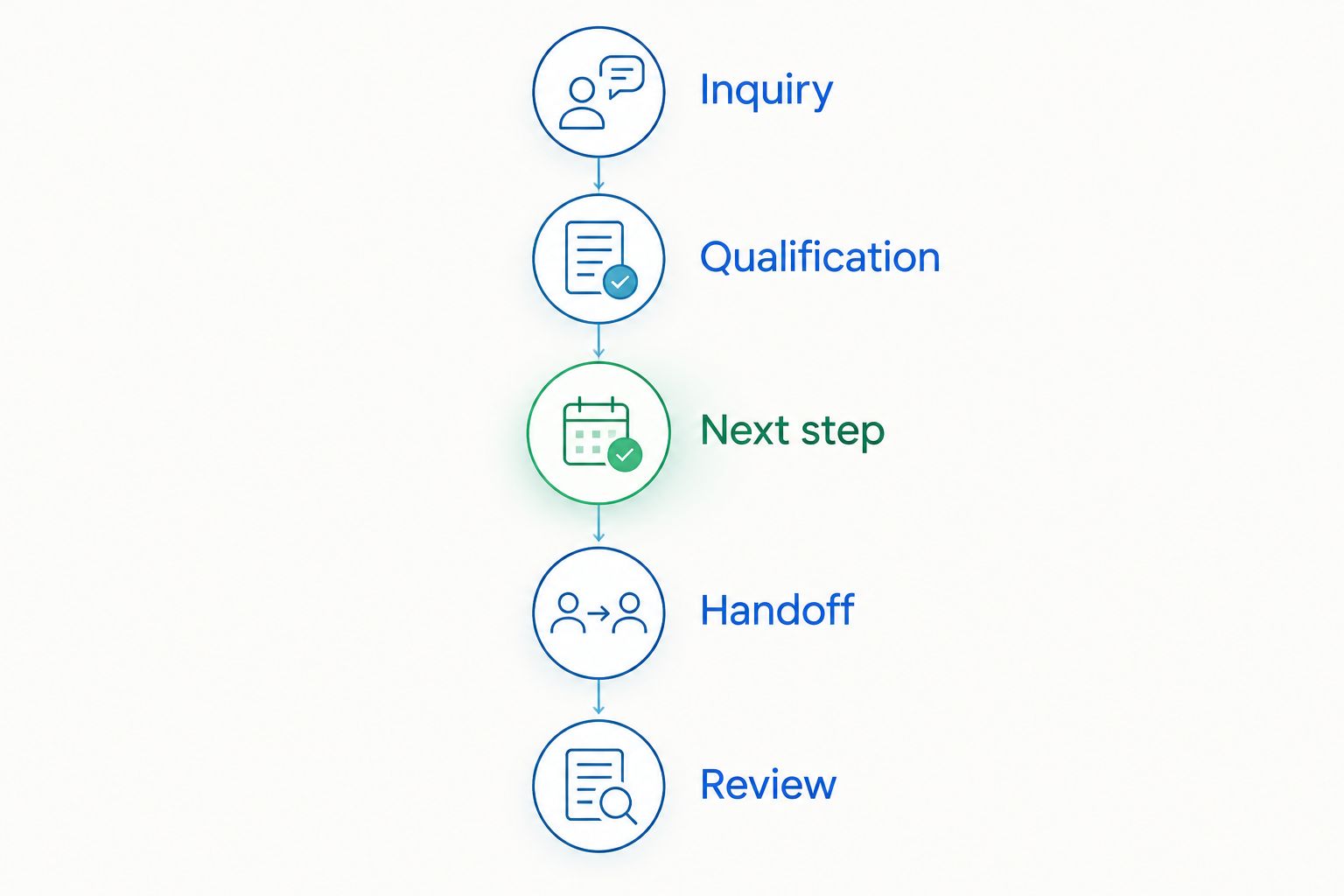
For a 2026 buying decision, use the same scenario across every relevant demonstration. A suggested test uses 10 sample inquiries, 2 staff members, and a 7-day review period; these are evaluation parameters, not product performance claims.
- Inquiry: Submit a realistic request with the information a prospect would normally provide.
- Qualification: Check how the workflow handles missing details and a question outside the usual script.
- Next step: Ask for a tour or another appropriate action and follow it through.
- Handoff: Have another staff member continue without a separate briefing.
- Review: Record what the software completed and what still required manual work.
Keep a simple record of corrections, repeated data entry, and unresolved requests. Do not turn the exercise into a beauty contest between dashboards. Your decision should rest on whether staff and prospects can complete the work.
Which venue workflow management software should you choose?
Choose VenueX when the immediate job is inquiry response, follow-up, and tour booking. Choose Tripleseat for event sales coordination, Planning Pod for planning organization, Event Temple for hotel group-sales requirements, or Skedda for internal room reservations.
For your 2026 purchase, resist replacing everything at once. Identify the workflow owner, prove the handoff, and establish which system holds the information staff need. Expand the purchase only when another requirement is clear.
Explore inquiry and tour automation
See how automated replies, follow-up, and appointment booking fit your venue sales workflow.
FAQ
What's the best venue workflow management software for inquiries?
VenueX is the pick here for automated inquiry replies, follow-up, and tour booking. Its stated channels include email, text, and web chat.
Is venue workflow management the same as room booking?
No. Venue workflow management can cover sales conversations, tours, planning, and operational handoffs, while room booking focuses on reserving space.
Should I choose Tripleseat or Planning Pod?
Shortlist Tripleseat for event sales coordination and Planning Pod for planning tasks and event details. Demonstrate the workflow your team needs before choosing either.
What should a hotel look for in venue workflow software?
A hotel should evaluate group-sales and catering requirements alongside its venue workflow. Event Temple belongs on that shortlist because hotel sales and catering are its product focus.
Can I use Skedda for venue sales?
Evaluate Skedda for shared-space reservations, not as an assumed replacement for hospitality sales software. Reserving a room and managing an event inquiry are different jobs.
Do I need to replace my existing event management system?
Not automatically. First establish whether the missing function is inquiry response, sales coordination, planning, or scheduling, then check the handoff to your existing system.
How should I evaluate venue workflow management software in 2026?
Use the same realistic workflow in each demonstration. Include an incomplete inquiry, a changed requirement, an appropriate next action, and a staff handoff.
One last thing
Do not let the original salesperson explain the inquiry during your handoff test. Ask the receiving colleague to identify what the prospect wants and what happens next from the system alone. That is a practical test of whether the workflow lives in your software or in someone's memory.