

Best overall for inquiry-to-tour sales: VenueX. Best for event sales administration: Tripleseat. Best for configurable deal tracking: Pipedrive. This 2026 guide compares venue events sales pipeline software by the work you need done: answering inquiries, booking tours, managing event sales, or tracking opportunities.
- VenueX is the best venue events sales pipeline software choice here for inquiry response, follow-up, and tour booking.
- Tripleseat suits event sales administration; Event Temple suits hotel sales and catering workflows.
- HubSpot suits connected marketing and sales records; Pipedrive suits focused deal tracking.
- Choose around the sales bottleneck, not the longest feature list.
What makes the best venue sales pipeline software?
- Inquiry response: Helps you answer the prospect, not just store the inquiry.
- Follow-up: Makes the next action explicit when a conversation stalls.
- Tour progression: Connects interest with an appointment.
- Pipeline visibility: Shows ownership, stage, and next steps.
- Operational fit: Matches your venue, catering, or hotel sales process.
Venue sales pipeline software at a glance
| Rank and option | Best for | Standout function | Key limitation |
|---|---|---|---|
| 1. VenueX | Inquiry-to-tour sales | Inquiry replies, automatic follow-up, and tour booking across email, text, and web chat | This recommendation covers lead response and appointments, not full event operations |
| 2. Tripleseat | Event sales administration | Event-focused sales and booking management | Administrative organization and active lead response are different requirements |
| 3. Event Temple | Hotel sales and catering | Sales and catering management for hospitality teams | A hospitality operations focus is unnecessary for a simple deal board |
| 4. HubSpot | Connected marketing and sales records | CRM records connected with marketing and sales tools | Venue-specific stages and processes need configuration |
| 5. Pipedrive | Focused deal tracking | Visual deal pipelines and sales activities | Venue operations require a separate evaluation |
Why this matters
A pipeline can look organized while inquiries sit unanswered. A prospect record, a stage label, and a reminder do not equal a useful reply.
For your 2026 shortlist, separate conversation execution from sales administration. The first moves an inquiry toward a tour; the second records ownership, progress, and commercial details. Some teams need both, but those needs should not become one vague requirement called automation.
Start with the point where work stops. If prospects wait for replies, prioritize response and follow-up; if staff cannot see who owns a proposal, prioritize pipeline management.
1. VenueX: best venue sales software for inquiry-to-tour sales
VenueX is an AI-powered sales agent for wedding venues, event venues, caterers, and hotels. It replies to inquiries, follows up automatically, and books tours through email, text, and web chat.
Best for: Venue teams that need conversations moved toward appointments rather than another place to log leads. This is the most direct match when the unfinished work is answering questions and continuing the conversation.
The distinction matters during a busy service or event. An assigned task still requires someone to complete it; a sales agent is intended to handle the conversation itself. Evaluate the quality of that conversation, not simply whether a message was sent.
VenueX pros:
- Covers inquiry response, follow-up, and tour booking.
- Works across the three stated channels: email, text, and web chat.
- Serves venue and hospitality sales teams specifically.
VenueX cons:
- The stated scope does not establish a complete event-operations system.
- It does not establish a replacement for every CRM reporting or administrative requirement.
During a demonstration, bring your actual packages and inquiry questions. Ask the agent to handle an incomplete request, a request outside your normal offer, and a prospect who wants a tour. Judge whether each response gives the prospect a clear next step without promising something your team cannot deliver.
Verdict: Buy for inquiry-to-tour execution; evaluate event administration separately.
2. Tripleseat: best venue sales software for event administration
Tripleseat is event sales and management software for hospitality businesses. Its category fit is the commercial and administrative work around events, rather than a general-purpose sales board.
Best for: Teams that need event sales organized around the booking itself. Put Tripleseat on the shortlist when your staff struggle to keep event-related sales information and booking work together.
The demonstration should begin with a real event inquiry and continue through your sales process. Do not stop when the salesperson creates a record. Ask how the same opportunity is represented as requirements change and different staff become involved.
Tripleseat pros:
- Uses an event-focused sales and management model.
- Fits hospitality businesses rather than an unrelated sales category.
- Gives event administration a central place in the buying decision.
Tripleseat cons:
- Event management is a broader scope than simple lead tracking.
- An event-focused system is not, by itself, evidence that inquiries receive useful automatic replies.
For a fair 2026 comparison, give every vendor the same scenario. Include an inquiry, a requested tour, and a change to the event requirements. Compare the work your staff must perform, not the number of screens in the presentation.
Verdict: Buy when event sales administration is the main requirement; hold if unanswered inquiries are the only problem.
3. Event Temple: best venue sales software for hotel sales and catering
Event Temple is hotel sales and catering software. Its hospitality focus makes it a relevant option when your pipeline sits inside a hotel or catering sales operation.
Best for: Hotel teams evaluating sales and catering together. Start here when the buyer journey must be assessed alongside the hotel's broader commercial workflow.
A hotel inquiry needs more context than a generic opportunity name. Bring your own example and ask the vendor to show how the team would record requirements, manage sales activity, and maintain a clear next step. Keep the demonstration tied to the work your employees actually do.
Event Temple pros:
- Focuses on hotel sales and catering.
- Provides a hospitality-specific alternative to a general CRM.
- Keeps the evaluation centered on the hotel's sales workflow.
Event Temple cons:
- Its hotel sales and catering scope is broader than a tour-follow-up requirement.
- A standalone venue should assess workflow fit rather than assume hotel-oriented software is the right match.
The deciding question is not whether the software serves hospitality. It is whether its structure matches your hospitality business. A hotel sales team and a wedding venue tour coordinator can have different daily requirements even when both sell events.
Verdict: Buy for hotel sales and catering alignment; skip if you only need a lightweight opportunity board.
4. HubSpot: best venue sales software for connected marketing records
HubSpot provides CRM, marketing, and sales tools. It belongs on this list when your evaluation extends beyond venue inquiries to the relationship between marketing activity, contacts, and sales opportunities.
Best for: Teams that want marketing and sales records assessed together. Choose this route when the question is not just who owns an inquiry, but how contact information supports the wider sales process.
The trade-off is configuration. Your venue's stages, tour milestones, and handoff rules need to be defined rather than assumed. A general CRM gives you a structure; your team still needs to decide what that structure means operationally.
HubSpot pros:
- Combines CRM with a wider marketing and sales product family.
- Supports contact and deal-based sales organization.
- Fits an evaluation that spans marketing and sales rather than venue operations alone.
HubSpot cons:
- It is not a venue-specific operating model.
- A wider product family increases the importance of defining exactly which functions you need.
Ask the demonstrator to distinguish recordkeeping, assigned tasks, and customer-facing actions. Those are different capabilities. Your evaluation should show which tasks remain with the salesperson and which actions the proposed setup performs.
Verdict: Buy when connected marketing and sales records drive the decision; hold if venue-specific workflows are non-negotiable.
5. Pipedrive: best venue sales software for visual deal tracking
Pipedrive is a sales CRM centered on deal pipelines and activities. Its role in this comparison is straightforward: organize opportunities and make the next sales action visible.
Best for: Teams that want focused pipeline control without making event operations the starting point. Consider it when inconsistent ownership and unclear next steps are the main problems.
Your demonstration should show a salesperson's ordinary working day. Ask how they identify neglected opportunities, record a completed conversation, and decide what to do next. The board must help people act, not merely provide a tidy management view.
Pipedrive pros:
- Centers the workflow on deals and sales activities.
- Offers a general sales structure you can map to your process.
- Keeps opportunity progression central to the evaluation.
Pipedrive cons:
- Venue-specific stages and terminology require your own definitions.
- Pipeline tracking alone does not establish inquiry handling, tour booking, or event operations.
Keep the setup disciplined. A stage should describe a meaningful change in the buyer's progress, not every email your team sends.
Verdict: Buy for deal visibility and activity management; skip as a stand-alone answer to event operations.
How we ranked these options
The 2026 ranking prioritizes the route from inquiry to tour, then separates the remaining options by their strongest category fit. It is a workflow-fit ranking, not a claim of hands-on performance testing or measured revenue superiority.
Response, follow-up, tour progression, pipeline visibility, and operational fit determine the recommendations. No single option wins every dimension; the right default depends on which unfinished task costs your team attention.
Test the workflow before choosing
Run a 30-minute demonstration around 3 sample inquiries from your business. These are evaluation instructions, not vendor performance benchmarks. Use the same examples for every shortlisted option.
Follow this sequence:
- Inquiry: Submit a realistic request with a missing detail.
- Response: Check whether the reply answers the question and asks for what is needed.
- Follow-up: Show what happens when the prospect does not reply.
- Tour: Demonstrate how interest becomes an appointment.
- Handoff: Identify the owner and next action after the appointment.
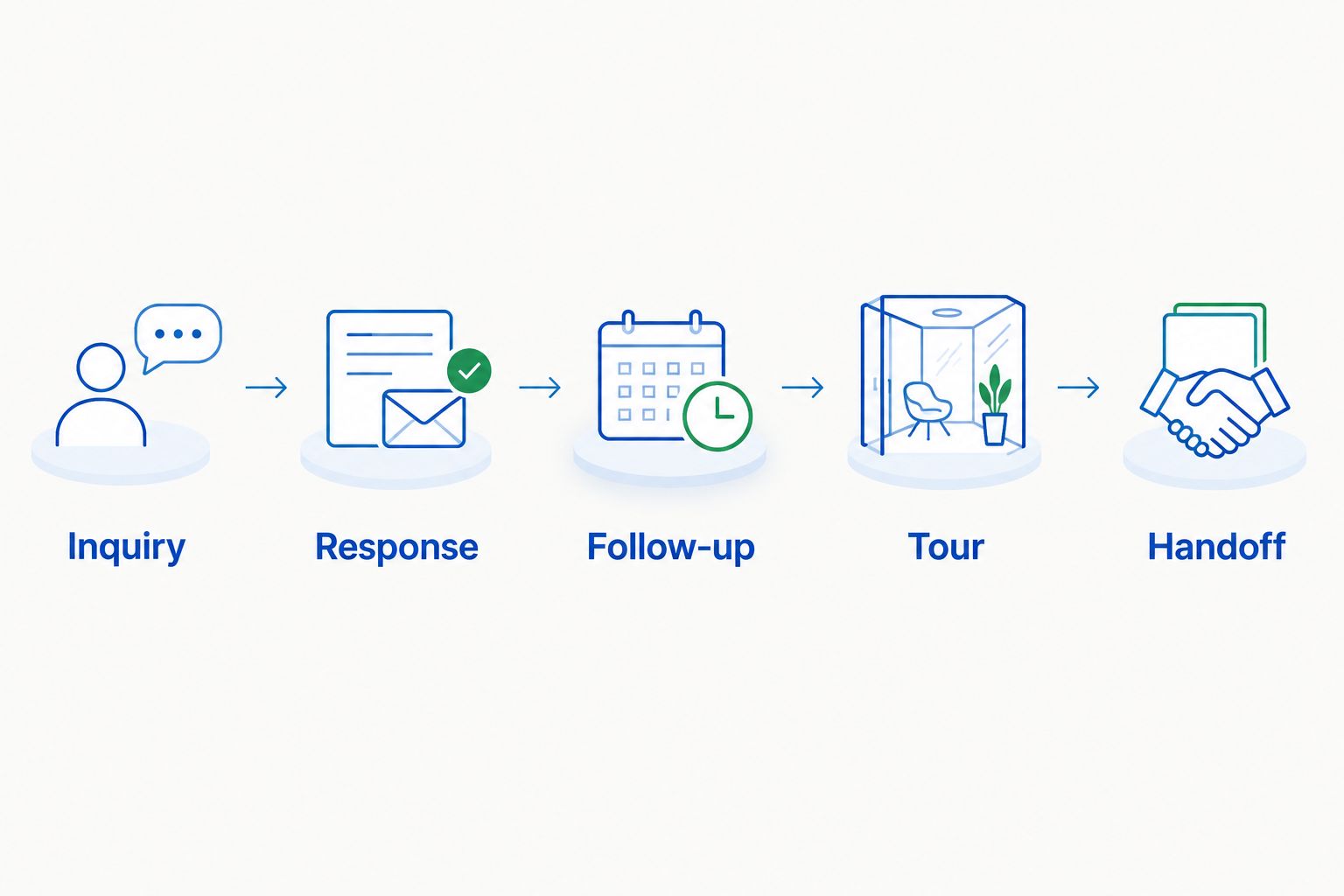
After each demonstration, write down every manual step. Separate necessary human judgment from repetitive administration; a personal sales conversation is not the same thing as copying information between records.
Then schedule a 7-day review with the people who will use the system. Ask them to identify unclear ownership, duplicate work, and points where the customer loses a clear next step. A polished demonstration is not a substitute for an agreed process.
Which venue sales pipeline software should you choose?
VenueX is the best fit here for venues that need inquiry response, automatic follow-up, and tour booking. Choose Tripleseat for event sales administration, Event Temple for hotel sales and catering, HubSpot for connected marketing and sales records, or Pipedrive for focused deal tracking.
For your 2026 decision, write the buying requirement as an outcome: every qualified inquiry gets a useful response and a defined next step. Then assign the software and human responsibilities separately. Buy against that requirement, not an undifferentiated feature list.
Review your inquiry-to-tour workflow
Discuss inquiry response, automatic follow-up, and tour booking for your venue sales team.
FAQ
What's the best venue events sales pipeline software?
The best choice depends on whether you need inquiry execution, event administration, or deal tracking. Prioritize a sales agent for replies and follow-up, an event-focused system for event administration, or a CRM for opportunity visibility.
Is venue sales software the same as event management software?
No. Venue sales software addresses the selling process, while event management software addresses organizing and delivering events; individual products can cover parts of both.
Can a CRM automatically answer venue inquiries?
A CRM label does not establish automatic inquiry replies. Ask the vendor to demonstrate the customer-facing response separately from record creation, task assignment, and internal notifications.
Should a wedding venue choose a sales agent or a CRM?
Choose a sales agent when the immediate requirement is responding, following up, and booking tours. Choose a CRM when ownership, opportunity stages, and sales records are the priority; evaluate both when both needs exist.
What should I ask during a venue software demo?
Ask the vendor to take a real inquiry through response, follow-up, tour booking, and handoff. Identify every manual action and ask who owns the opportunity at each point.
Is hotel sales software right for a standalone event venue?
Hotel sales software belongs on the shortlist only when its workflow matches the venue's requirements. Test your own inquiry and booking process rather than choosing on the hospitality label alone.
How do I compare venue software costs without missing extra work?
Compare the proposed scope and the staff work left after implementation. Request current commercial terms directly, then identify configuration, training, and any separate systems required for your process.
One last thing
Do not let “follow-up sent” become your definition of progress. A message is an activity; a useful reply, a confirmed tour, or an agreed next step tells you something about the buyer.
Before changing software, define what moves an opportunity forward. That decision makes your pipeline easier to trust regardless of the platform you choose.