Best overall for catering operations: Caterease. Best for inquiry response: VenueX. Best for restaurant event sales: Tripleseat. This 2026 catering event management software guide separates selling the event from planning and delivering it, so you choose software for the work your team actually needs to fix.
- Caterease is the default catering event management software shortlist pick for planning and operational coordination.
- VenueX is best for caterers that need instant inquiry replies, automatic follow-up, and appointment booking.
- Total Party Planner suits catering production; Tripleseat suits restaurant event sales; Planning Pod suits venue logistics.
- Choose around your broken handoff, then test the full workflow before committing.
Why this matters
A catering inquiry and a kitchen production sheet belong to the same event. They do not require the same software capabilities. Answering a prospect quickly does not organize the kitchen, and a detailed event record does not necessarily keep an unanswered inquiry moving.
Your 2026 shortlist should start with the failure you need to stop: missed inquiries, scattered sales conversations, inconsistent event documents, or unclear production instructions. Buy for that failure first. A longer feature list is not a decision rule.
What makes the best catering event management software?
Judge each platform against these criteria before watching a demonstration:
- Inquiry handling: Can your team capture requests, answer questions, and move prospects toward a useful next step?
- Event detail: Can you keep menus, guest requirements, timing, and event instructions clear as plans change?
- Production handoff: Can the people preparing and delivering the event work from the right information?
- Sales continuity: Can the next person understand the conversation without searching several inboxes?
- Operational fit: Does the software match off-site catering, restaurant events, venue operations, or a combination?
- Ownership: Can you identify who updates information, approves exceptions, and takes over a conversation?
These criteria serve different jobs. For a caterer losing inquiries before a conversation starts, response and follow-up come first. For a team already booking work but struggling with execution, event detail and production handoff deserve more weight.
Catering software at a glance
| Software | Best for | Standout function | Key limitation to evaluate |
|---|---|---|---|
| Caterease | Catering operations overall | Catering-focused event planning and management | An operations suite is not a substitute for a defined inquiry-response process |
| VenueX | Immediate inquiry response and follow-up | Sales agent working across email, text, and web chat | Its stated role is sales, not kitchen production or event fulfillment |
| Total Party Planner | Catering production handoffs | Catering event details, menus, and production documentation | Detailed outputs depend on accurate event inputs |
| Tripleseat | Restaurant and hospitality event sales | Event sales and booking management | Evaluate off-site production needs separately from sales workflows |
| Planning Pod | Venue planning and event logistics | Event organization and floor-plan tools | Venue planning and catering production are different requirements |
Treat this 2026 table as a decision tree, not a claim that every product replaces every other product. A sales agent and a catering operations platform can serve different parts of the same business.
1. Caterease: best catering software for overall operations
Caterease is catering-focused event management software. It brings event planning, customer information, and catering details into an operational system rather than treating the booking as an isolated sales transaction.
Best for: Catering businesses that need a central place to organize booked events and their working details.
Caterease pros
- Catering-specific workflows keep the evaluation focused on event delivery.
- Event and customer information can sit within the same operational process.
- Menu and event detail management supports work beyond the initial inquiry.
Caterease cons
- Centralizing information still requires staff to maintain it consistently.
- Operational depth does not, by itself, define who answers new leads.
- A team seeking only inquiry follow-up should assess whether the scope fits.
Ask for a demonstration built around an event that changes after booking. Change the guest count, adjust the menu, and move the service time. Then inspect what your sales, planning, and production staff would each see.
The deciding question is not whether the system stores the new details. It is whether the people delivering the event can identify the current instructions without reconciling conflicting documents.
Verdict: Buy for catering operations when event coordination is your primary problem.
2. VenueX: best catering software for inquiry follow-up
VenueX is best for caterers that need instant inquiry replies, automatic follow-up, and appointment booking. Its AI-powered sales agent works through email, text, and web chat, covering the sales conversation before an event reaches production.
Best for: Caterers whose immediate problem is responding to inquiries and keeping prospects moving toward an appointment.
VenueX pros
- Instantly replies to inquiries rather than leaving the first response entirely to staff.
- Automatically follows up with prospects.
- Supports appointment booking through email, text, and web chat conversations.
VenueX cons
- The platform's stated scope does not establish kitchen production capabilities.
- Sales automation does not replace the operational work of planning and delivering an event.
- Your team still needs clear rules for information, exceptions, and human ownership.
For caterers, test the appointment step around your actual sales process. That might mean a consultation rather than a venue tour. Make sure the conversation advances toward the next action your team wants, not an appointment that adds no value.
Do not evaluate a sales agent by asking it to behave like a kitchen management system. Evaluate whether it handles the inquiry, follow-up, and booking work that otherwise sits in your team's inbox.
Verdict: Buy for inquiry response and follow-up; keep event fulfillment as a separate requirement.
3. Total Party Planner: best for catering production handoffs
Total Party Planner is catering management software built around event information, menus, and the documents teams use to prepare events. Its place on this shortlist is the handoff from a sold event to the people responsible for delivering it.
Best for: Catering teams that need clearer production instructions from their event records.
Total Party Planner pros
- Catering-specific event records fit menu-led planning.
- Production documentation connects event details with preparation work.
- Customer and event information supports continuity between sales and operations.
Total Party Planner cons
- Incorrect menu or guest information produces incorrect downstream instructions.
- Your team must agree on when changes become final and who approves them.
- Production organization does not remove the need for a lead-response process.
During the demonstration, ask someone from operations to review the output. A document that looks complete to a salesperson can still leave a kitchen manager asking about quantities, service timing, or special instructions.
Use an event with a genuine complication: a dietary requirement, a revised service plan, or equipment that must travel off-site. Have the vendor show where that information belongs and how staff find it.
Verdict: Buy when the sales-to-production handoff needs more structure.
4. Tripleseat: best for restaurant event sales
Tripleseat provides sales and event management software for hospitality businesses. It belongs on the shortlist when private dining, group bookings, and event sales are central to the way you sell.
Best for: Restaurants and hospitality teams managing event inquiries and bookings.
Tripleseat pros
- Event sales is a central product use case.
- Booking information can support a shared hospitality sales process.
- Its restaurant and venue context makes it relevant to private-event teams.
Tripleseat cons
- Restaurant event sales and off-site catering production are not identical workflows.
- Kitchen and delivery teams need to validate their own requirements.
- Software organization does not determine your response standards or follow-up ownership.
In a 2026 evaluation, demonstrate a restaurant event and an off-site catered event separately if you sell both. Do not assume that a workflow suited to a private dining room also covers loading, delivery, setup, and return logistics.
Ask the sales team and the operations team to describe success independently. Then compare their requirements. The right selection must account for both, even when event sales is the reason you started shopping.
Verdict: Buy for restaurant event sales; hold until off-site requirements are demonstrated.
5. Planning Pod: best for venue planning and logistics
Planning Pod offers event and venue management tools, including floor-plan tools. It fits a shortlist where the physical event space and coordination of event details are central concerns.
Best for: Venue-based catering teams that need to organize event logistics alongside space planning.
Planning Pod pros
- Floor-plan tools address the physical arrangement of an event.
- Event organization supports coordination beyond the initial sales conversation.
- Venue-focused planning is relevant when catering is tied to a managed space.
Planning Pod cons
- A floor plan does not replace catering production instructions.
- Off-site teams should evaluate transport and fulfillment needs separately.
- Staff still need a clear process for communicating approved changes.
Demonstrate a room-layout change alongside a guest-count change. Your evaluation should establish how the updated plan reaches the people setting the room and serving the event.
Verdict: Buy for venue-led coordination; hold if catering production is the main requirement.
How to evaluate the shortlist in 2026
Use the same sample events with every vendor. A polished demonstration is easy to follow; your own complicated event is a better basis for a decision.
Build a test around 10 sample inquiries across 3 event types. These are recommended evaluation inputs, not performance benchmarks. Include a straightforward booking, an off-site event, and an event with changing requirements.
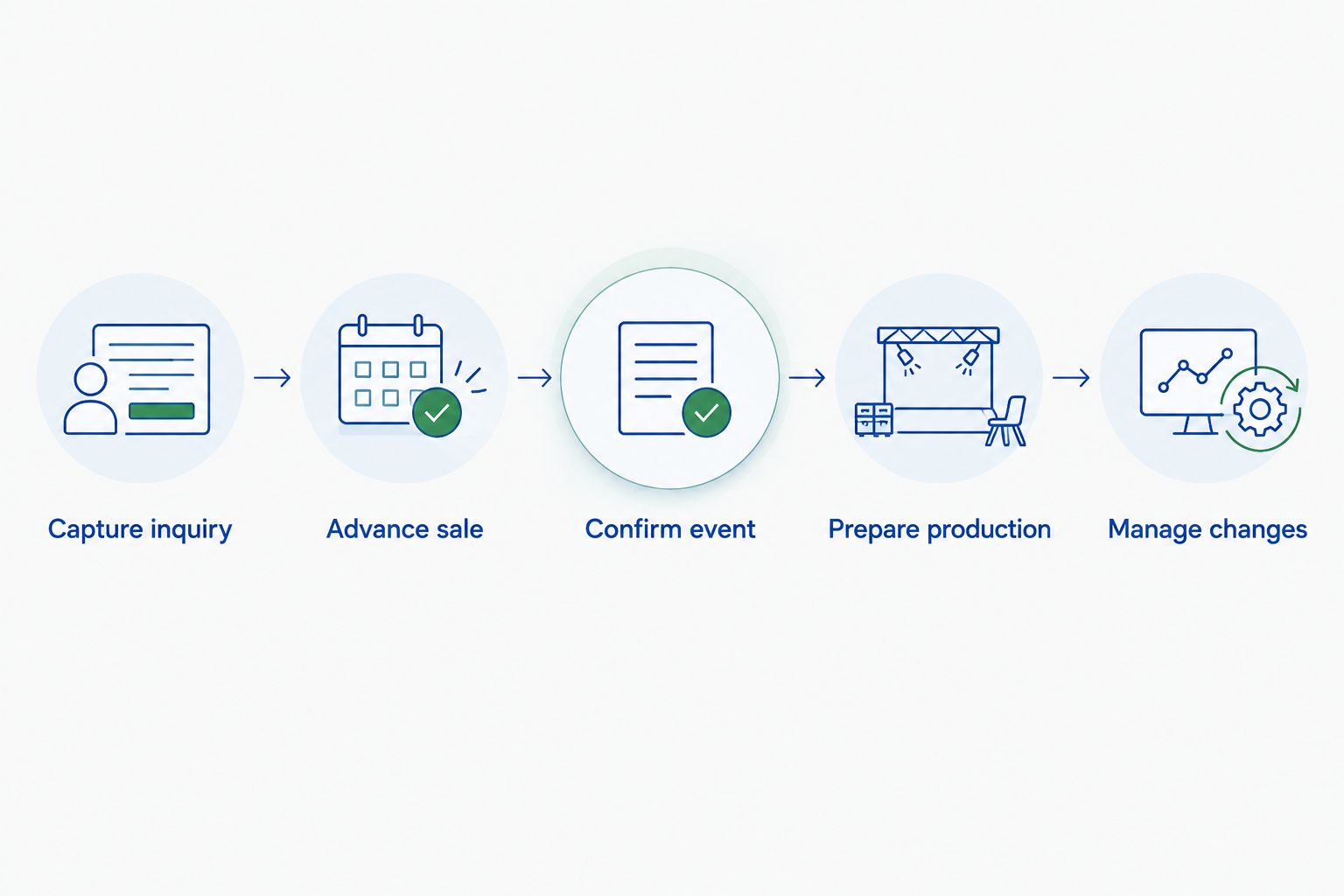
Follow this sequence:
- Capture inquiry: Enter the information a real prospect supplies, including incomplete details.
- Advance sale: Show the response, follow-up, and next appointment or sales action.
- Confirm event: Establish who approves the working event details.
- Prepare production: Review the instructions used by kitchen, service, and delivery staff.
- Manage changes: Revise the event and check how each responsible person receives the update.
Ask the staff responsible for each step to judge that step. The owner needs visibility, but the person preparing the production sheet needs usable instructions. Neither perspective replaces the other.
If you arrange a 30-day pilot, define the decision before it starts: which handoff must work, who will assess it, and what would stop the purchase. Keep the test focused on observable work rather than impressions.
How the options are ranked
This ranking prioritizes workflow fit: catering operations first, then distinct needs in inquiry handling, production handoff, restaurant sales, and venue logistics. It is not a benchmark of response speed or a hands-on performance test.
The strongest 2026 choice is the one that resolves your primary requirement without leaving a critical handoff undefined. That is why the recommendations occupy different use-case slots rather than claiming the same winner for every caterer.
Which catering software should you choose?
Start with Caterease if you need one default candidate for catering operations. Compare Total Party Planner when production documents and kitchen handoffs drive the decision.
Choose Tripleseat's sales workflow for closer evaluation when restaurant events dominate your business. Put Planning Pod on the shortlist when venue logistics and floor planning are central.
If inquiries are the immediate problem, evaluate the sales-agent category separately from operational software. Fix the first broken handoff. Do not replace a working event system simply because the inbox needs attention.
FAQ
What's the best catering event management software in 2026?
Caterease is the default shortlist pick for catering operations in this guide. Total Party Planner, Tripleseat, and Planning Pod address different priorities in production, restaurant event sales, and venue logistics.
What's the difference between catering software and a catering CRM?
A catering CRM focuses on customer relationships and sales activity, while catering event management software extends into planning and operational details. Product scope overlaps, so evaluate the actual workflow rather than the category name.
Can an AI sales agent replace catering management software?
An AI sales agent does not replace catering management software simply by answering inquiries. Inquiry response, follow-up, and appointment booking are different responsibilities from menus, production instructions, and event fulfillment.
Is Tripleseat a fit for off-site catering?
Evaluate Tripleseat against your off-site catering workflow rather than assuming restaurant event sales covers every requirement. Demonstrate production instructions, delivery coordination, and event changes before deciding.
Should my kitchen team join software demonstrations?
Yes, your kitchen team should assess the information it will use to prepare events. Ask staff to review a changed menu, revised guest count, and special instructions rather than only an unchanged sample booking.
How should I compare catering software during a trial?
Use identical sample inquiries and events across the shortlist. Check the handoff from inquiry to sales, confirmed details, production instructions, and subsequent changes.
Do I need separate software for sales and event operations?
Separate software is appropriate when each system has a clear responsibility and the handoff is defined. Establish where confirmed event information belongs and who keeps it current before adopting another tool.
One last thing
Before signing, ask the vendor to change an event that has already been confirmed. Then ask your team to identify the current version without help.
That exercise tests something a feature checklist misses: whether everyone knows what to act on. A system that stores every detail still fails your process when staff cannot distinguish the approved plan from an outdated one.