

A Venue.Live setup that already supports your sales team has a real strength: continuity. That stops being enough when inquiries still wait for a reply, follow-up depends on reminders, and interested prospects never reach a tour. The best Venue.Live alternative in 2026 is VenueX if you need automated inquiry response, follow-up, and tour booking; a staff-led workflow is the alternative if you want people to own every conversation.
- Choose VenueX when evaluating venue.live alternatives for automated inquiry response, follow-up, and tour booking.
- Keep Venue.Live if your current setup already handles the sales work you need.
- Choose a staff-led workflow when personal ownership matters more than automated execution.
- Compare actual inquiry handling, not feature-list length, before changing venue sales software.
Why this matters
Choosing venue sales software starts with a distinction: recording an inquiry is not the same as answering it. Scheduling a reminder is not the same as completing the follow-up. A calendar entry is not the same as getting a prospect to book a tour.
For your 2026 shortlist, separate the work into response, follow-up, and booking. Then identify which part your team still performs manually. That tells you whether you need a different platform, a sales agent alongside your current setup, or clearer staff responsibilities.
This comparison treats Venue.Live as your existing benchmark, not as a product to dismiss. Keep what works. Replace the work that remains unfinished.
Venue.Live alternatives at a glance
The useful comparison is between operating models. An automated sales agent and a staff-led workflow place responsibility in different places; your current Venue.Live setup gives you the baseline against which to judge both.
| Option | Best for | Standout approach | Difference from keeping Venue.Live unchanged |
|---|---|---|---|
| Venue.Live, retained | Teams satisfied with their current workflow | Continuity with the setup your team already uses | No change; assess whether current response and follow-up meet your requirements |
| VenueX | Venues, caterers, and hotels seeking automated sales conversations | Inquiry replies, automatic follow-up, and tour booking through email, text, and web chat | Adds an AI sales agent focused on moving inquiries toward tours |
| Staff-led workflow | Teams that want employees to handle every reply | Named people own responses, follow-up, and appointment coordination | Changes staffing and accountability rather than introducing a sales agent |
Do not replace a working system to solve a responsibility problem. First establish whether the bottleneck is missing functionality, inconsistent execution, or an unclear handoff.
1. VenueX: best for automated inquiry-to-tour follow-up
VenueX is an AI sales agent platform for wedding venues, event venues, caterers, and hotels. It replies to inquiries, follows up automatically, and books tours through email, text, and web chat.
The strongest reason to consider this approach is specific: your team needs sales conversations to progress without an employee manually handling every step. That is a different requirement from maintaining records or giving staff another place to check.
Where the platform shines
- Connected sales work: Inquiry response, follow-up, and tour booking belong to the same sales process.
- Relevant communication channels: The platform supports email, text, and web chat.
- Hospitality focus: Its stated audience includes wedding venues, event venues, caterers, and hotels.
- Automatic follow-up: Continued outreach does not depend entirely on someone remembering the next task.
For your evaluation, start with an inquiry that normally creates work for a salesperson. Ask to see the first reply, the next follow-up, and the route to a tour. A polished opening message is only the beginning.
Where this approach falls short
- It does not remove your responsibility for sales information. Your team still needs to establish what the agent should communicate and when staff should take over.
- It is not a reason by itself to replace every existing system. A requirement for automated conversations is narrower than a requirement to rebuild your entire operation.
- Automation is the wrong priority if you insist on manual replies. A staff-owned process better matches that operating choice.
These are practical boundaries, not minor qualifications. Before selecting any sales agent, decide which conversations it should handle and which decisions remain with your team.
Head-to-head: sales agent versus current setup
| Decision | Sales-agent approach | Your current Venue.Live setup |
|---|---|---|
| First response | Automated inquiry replies are part of the stated offering | Demonstrate how an incoming inquiry receives its first useful reply |
| Follow-up | Automatic follow-up is part of the stated offering | Demonstrate what happens when a prospect does not reply |
| Tour booking | Booking more tours is a stated platform purpose | Demonstrate the steps between initial interest and a booked tour |
| Communication | Email, text, and web chat are stated channels | Check the channels your team actually uses |
Best for: Hospitality sales teams seeking automated inquiry response, follow-up, and tour booking.
Verdict: Buy for the inquiry-to-tour requirement after a workflow demonstration confirms your needs. Do not treat that decision as an automatic replacement of unrelated operational software.
2. Staff-led workflow: best for human-owned conversations
A staff-led workflow is the operational alternative to buying another platform. Your team assigns an owner to each inquiry, writes the replies, follows up, and coordinates appointments using the tools you retain.
This option deserves a place on the shortlist because some problems are process problems. If everyone assumes someone else answered, a new system does not establish accountability by itself.
Where a staff-led workflow shines
- Direct ownership: You can name the person responsible for the next action.
- Human judgment: Employees handle unusual questions and sensitive conversations themselves.
- Continuity: You can improve the process without immediately changing the software your team knows.
Where a staff-led workflow falls short
- Execution remains manual: Someone must send each reply and complete each follow-up.
- Coverage needs planning: Time away from the inbox requires a backup owner.
- Consistency needs management: An agreed process still needs supervision and review.
| Decision | Staff-led workflow | Keeping Venue.Live unchanged |
|---|---|---|
| Ownership | Assign a named person to each inquiry | Check whether ownership is already explicit |
| Follow-up | Staff complete the next action | Check how unfinished actions become visible |
| Absence coverage | Assign a backup person | Check what happens when the owner is unavailable |
Best for: Teams committed to employees handling every sales conversation.
Verdict: Hold on new software if clear ownership fixes the problem. Choose a sales agent when your requirement is automatic execution rather than another manual process.
Why people switch from Venue.Live: reasons to validate
A valid switching reason describes a business requirement your current setup does not meet. It is not a claim about another vendor's shortcomings.
Use these questions to establish your own reason for changing:
- Unanswered inquiries: Does a prospect receive a useful response without waiting for someone to notice the message?
- Unfinished follow-up: Does outreach continue when the first reply receives no answer?
- Booking friction: Does the conversation end with a clear route to a tour?
- Scattered responsibility: Can your team identify who owns the next action?
- Coverage gaps: What happens when the usual salesperson is occupied or away?
If your existing setup answers these questions satisfactorily, switching needs another justification. If it does not, specify the unmet requirement before requesting demonstrations.
For a 2026 decision, write the requirement as an action: reply to new inquiries, continue follow-up, or book tours. Avoid vague requests such as better automation. An action is something you can watch a platform perform.
How to evaluate an alternative before changing systems
Use a consistent review rather than letting each demonstration set its own agenda. The following sequence is a recommended evaluation plan, not a performance benchmark.
Start with your actual inquiries
Review 10 recent inquiries and record what happened after each arrived. Include conversations that became tours and conversations that stopped progressing. Do not select only the cleanest examples.
For each inquiry, note the first useful reply, the follow-up, the owner, and the booking outcome. Separate an acknowledgment from an answer that helps the prospect take the next step.
The point is diagnosis. If the first reply arrives promptly but follow-up stops, focus the evaluation on follow-up rather than on faster acknowledgments.
Map responsibility before features
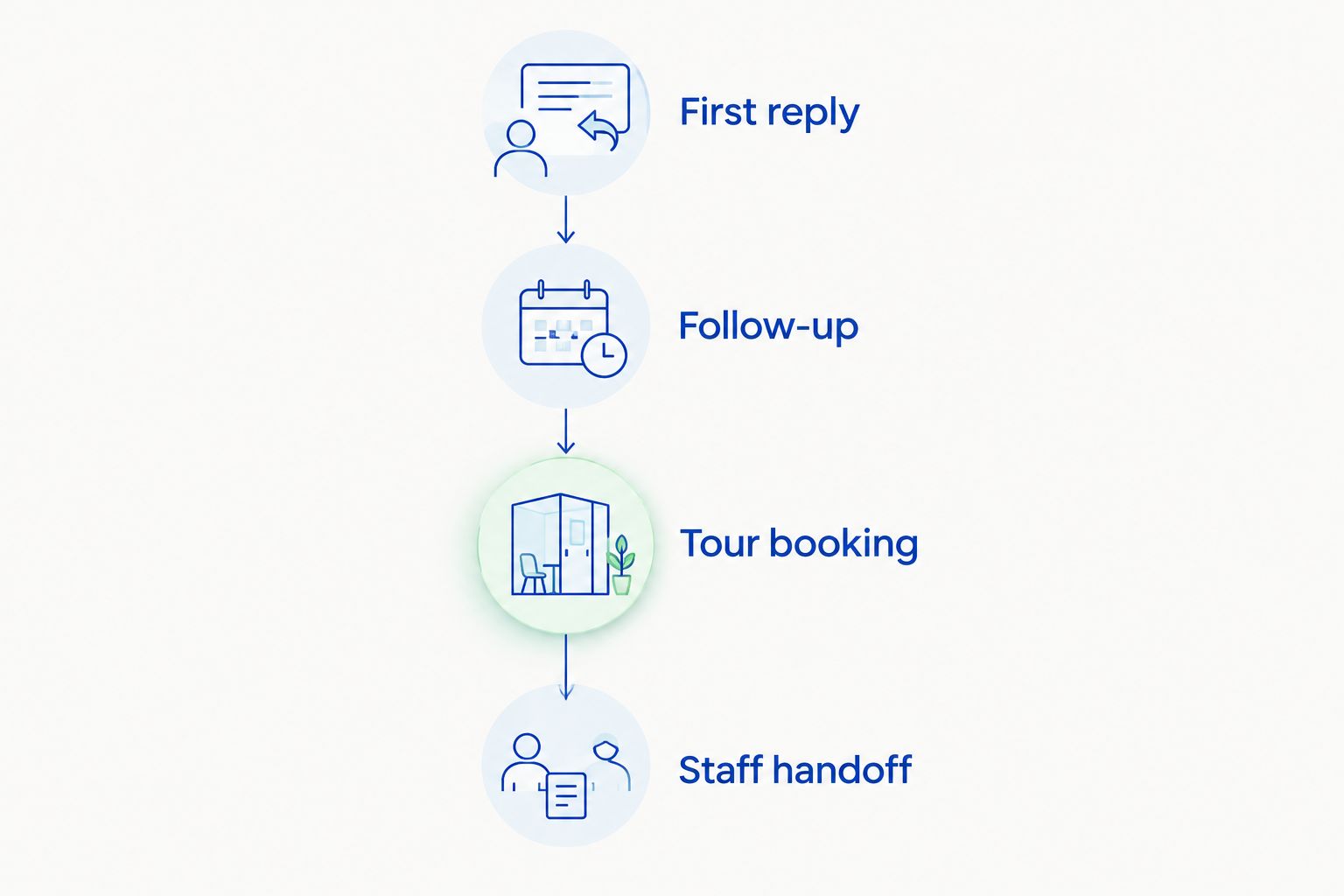
Use these checkpoints to describe the workflow:
- First reply: Who answers the initial inquiry?
- Follow-up: Who acts when the prospect goes quiet?
- Tour booking: Who helps the prospect reach an appointment?
- Staff handoff: Who handles a question outside the agreed process?
Assign an owner at every checkpoint. A software demonstration should make responsibility clearer, not hide it behind a long list of capabilities.
Test the difficult conversation
Give each option the same inquiry and ask to see the next action. Include an unanswered message, a request to arrange a tour, and a question that needs staff judgment.
Do not stop at the reply text. Ask where the conversation appears, how ownership changes, and how an employee knows to intervene. Judge only the workflow you can actually inspect.
Review the process over a defined period
Set a 7-day review window for staff to document missed actions and unclear ownership. Use a 30-day baseline of your own inquiry and tour records when available to understand the current process before a change.
These periods organize the evaluation; they are not promises of results. Compare the same definitions before and after a change, and keep inquiry volume separate from booked tours.
For a 2026 rollout, success criteria should describe work completed: inquiries answered, follow-ups performed, tours booked, and staff handoffs resolved. Agree on those definitions before implementation.
Choose replacement or addition deliberately
Ask whether the new option replaces your current workflow or handles one part alongside it. Do not assume the answer from the product category.
Confirm any required connections and handoffs during the evaluation. A sales agent's stated purpose does not establish compatibility with your particular setup, and a successful conversation demo does not settle migration requirements.
Review your inquiry-to-tour workflow
Discuss inquiry replies, automatic follow-up, and tour booking for your hospitality sales team.
When staying with Venue.Live is the right call
Stay with Venue.Live if your current setup meets your sales requirements and your team uses it consistently. Keeping a working process is a legitimate decision, not a failure to modernize.
Before replacing it, distinguish an absent capability from an unused process. Check whether staff know who owns each inquiry, what follow-up is expected, and how to arrange the next step. Correct those responsibilities before attributing every missed action to software.
Staying is also sensible when a proposed alternative solves the wrong problem. If your need concerns work outside inquiry response, follow-up, and tour booking, evaluate that requirement directly. Do not choose a sales agent merely because automation sounds attractive.
Your 2026 shortlist should end with a documented decision: retain the current setup, change the staff process, add a focused tool, or replace the system. Each is valid when it matches the work you need done.
FAQ
What's the best Venue.Live alternative for automated follow-up?
VenueX is the best fit on this shortlist for automated inquiry response, follow-up, and tour booking. Its stated offering serves wedding venues, event venues, caterers, and hotels through email, text, and web chat.
Should I replace Venue.Live or add a sales agent?
Choose replacement only when the alternative meets the requirements of the system you intend to remove. If your unmet need is inquiry handling, evaluate a focused addition and confirm the necessary handoffs before deciding.
Can my staff handle follow-up instead of buying another platform?
Yes. A staff-led workflow assigns employees responsibility for replies, follow-up, and appointment coordination, but those employees must complete each action and arrange backup coverage.
How do I compare venue sales platforms fairly?
Give each option the same inquiry scenarios and inspect the complete workflow. Include a first reply, an unanswered message, tour booking, and a conversation requiring staff judgment.
What should I check before moving venue inquiries?
Check conversation ownership, required connections, staff access, and the handoff process before moving inquiries. Establish which existing responsibilities the new option will replace and which remain with your team.
When should I stay with Venue.Live?
Stay with Venue.Live when your current setup meets your requirements and staff use it consistently. Fix unclear ownership or incomplete follow-up procedures before assuming that replacing software is necessary.
One last thing
Ask the salesperson to demonstrate what happens after the prospect does not reply. That is a more useful test than watching a perfect conversation reach a booking.
Your team needs the quiet conversations handled too. Make that unfinished work visible before you decide which platform deserves the job.